


Ready to transform your IT experience? Reach out to our experts to discuss how our tailored solutions can meet your business needs and keep your technology running smoothly.
RTO vs RPO: What They Mean for Your Small Business
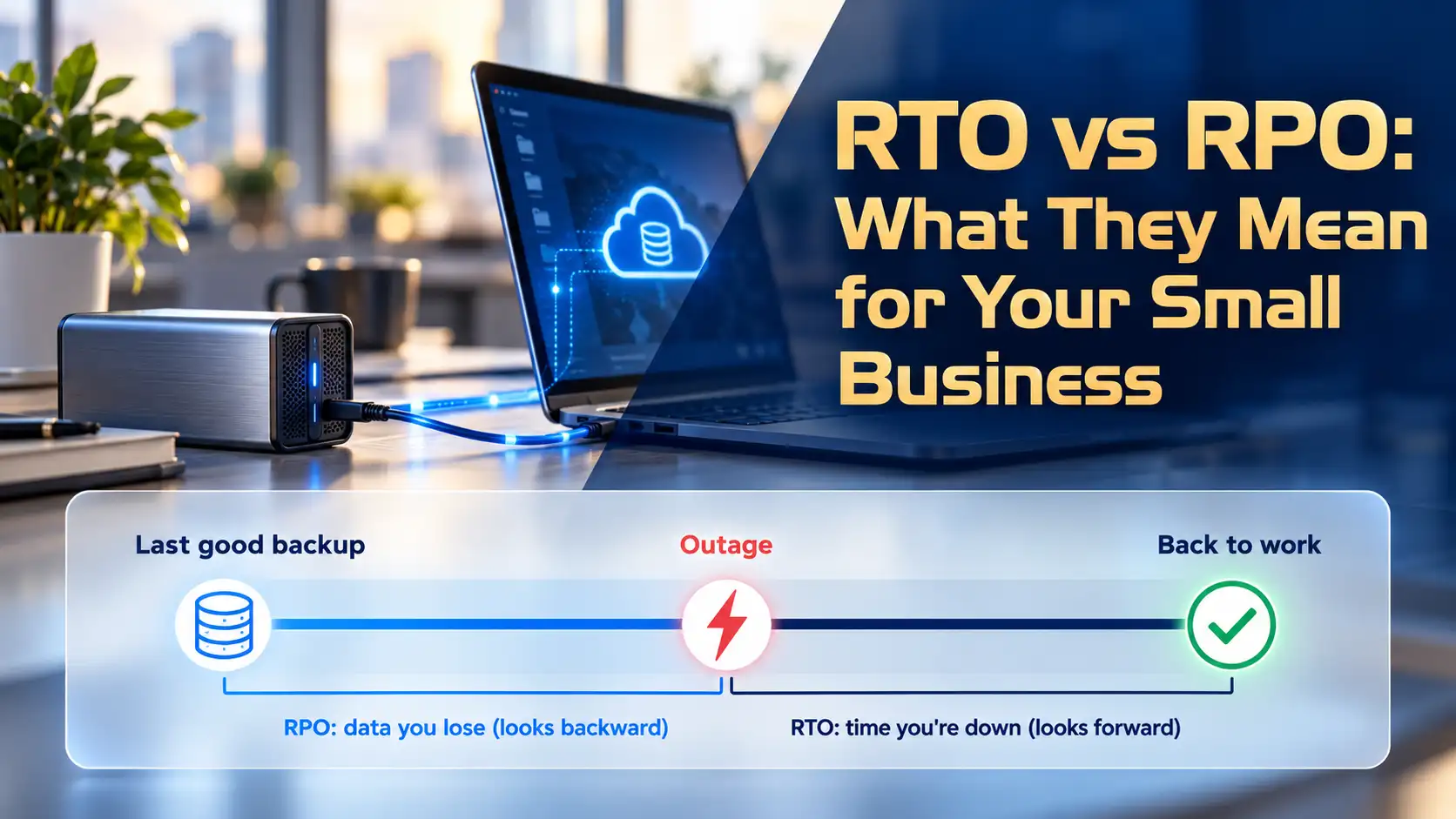
RTO vs RPO comes down to two questions every owner should answer. Recovery time objective (RTO) is how long a system can stay down before the outage hurts your business. Recovery point objective (RPO) is how much data you can afford to lose, measured in time. RTO sets how fast you restore. RPO sets how often you back up.
Those two numbers quietly drive every backup decision you make: what you buy, how often it runs, and how bad a bad day gets. It’s why our managed IT team in Los Angeles sets RTO and RPO targets with each new client during onboarding, before we change a single backup job.
This guide walks through both terms in plain English, shows you how to set your own targets, and gives you a worksheet you can fill in this week.
RTO vs RPO: The Key Differences at a Glance
| RTO (Recovery Time Objective) | RPO (Recovery Point Objective) | |
|---|---|---|
| What it measures | Time your system is down | Data you lose, measured in time |
| Direction | Forward from the failure | Backward from the failure |
| The question | How long can we wait to get it back? | How much recent work can we lose? |
| What it drives | Restore method, spare hardware, staff | Backup frequency |
| Example | RTO of 4 hours: staff working again by lunch | RPO of 1 hour: lose up to one hour of entries |
| How to improve it | Faster restore tools, failover, practice | More frequent backups |
Think of them as two dials you set separately. A company can lose almost nothing (a 15-minute RPO) and still take a full day to get running again (a one-day RTO). Plenty do.
What Is RTO (Recovery Time Objective)?
RTO is the longest a system can stay down before the outage starts to cost you real money, clients or credibility. The federal contingency planning guide, NIST SP 800-34, frames it as the time a system can spend in recovery before it harms the organization. In everyday terms, it’s your deadline for being back at work.
RTO Is a Target, Not a Guarantee
Your RTO is the goal you write down. What you can actually pull off is your recovery time actual (RTA), and the only way to learn it is to run a real restore with a stopwatch going.
What Counts as “Recovered”
When we test recovery with clients, the server coming back online is the easy part. The clock stops when staff can sign in, open their files and get back to clients. Several things have to line up for that to happen:
- Check sign-in. If Microsoft Entra ID or your multi-factor authentication (MFA) app is down or misconfigured, nobody gets in.
- Check the internet line. Cloud backups restore only as fast as your connection allows.
- Check line-of-business apps. Practice management or accounting software may need a license server, a database, or a call to the vendor.
- Check phones and printers. Staff can’t serve clients without them.
Sign-in and the internet line are the two that catch owners off guard most often. Write them into your RTO from the start, so the number reflects how your office actually works.
What Is RPO (Recovery Point Objective)?
RPO is the most data your business can lose, measured as the time between your last good backup and the moment something breaks. NIST describes it as the point in time your data must be recovered to after an outage. Back up every four hours, and on a bad day you could lose up to four hours of work.
Your Real RPO Is Your Last Good Backup
Most guides stop at the schedule. In practice, the number that matters is when your last backup actually finished cleanly.
Say a backup is set to run every hour, but it quietly stopped three weeks ago. Your RPO is now three weeks, and nobody knows until the day they need a restore. We run into this often in new client assessments. The backup software is installed, the schedule looks right, and the newest usable copy turns out to be far older than anyone assumed.
Picture how it unfolds at a 40-person accounting firm with a nightly server backup. The owner believes they could lose a day of work at most. Then the backup drive fills up, the job starts failing, and the alert emails pile up in a mailbox nobody checks. A few weeks later, ransomware hits. The most recent clean copy predates weeks of client files, and the one-day RPO the owner counted on was never real.
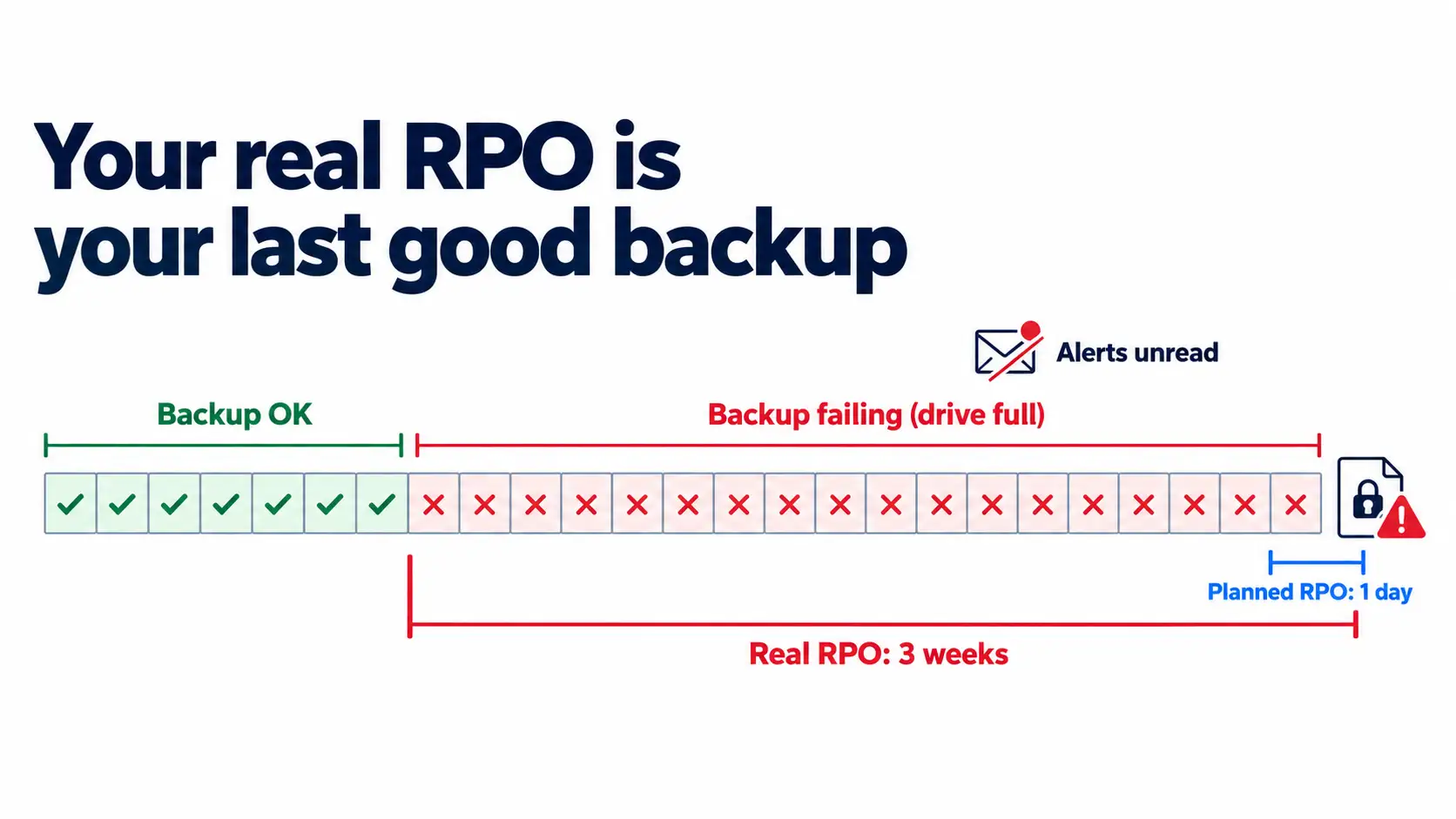
That gap is why our team monitors backup jobs daily, confirms each one completed, and chases down failures the same day. Monitoring keeps your real RPO close to the one on paper. If you’re still choosing a backup setup, the 3-2-1 backup rule is the right place to start.
RTO vs RPO vs MTD and MTTR
Disaster recovery plans tend to pile up acronyms. These are the three you’ll see next to RTO and RPO most often.
| Term | What it means | How it relates |
|---|---|---|
| MTD (Maximum Tolerable Downtime) | How long a business process can be down before it causes serious harm | The hard limit |
| RTO | Your target time to restore a system | Set it below MTD, with buffer |
| RPO | Your target for maximum data loss | Set by backup frequency |
| RTA (Recovery Time Actual) | What you achieve in a real test | Should land at or under RTO |
| MTTR (Mean Time to Recover) | Average real recovery time across incidents | Shows if you’re improving |
An easy way to keep them straight: MTD is the wall, RTO is where you plan to stop, and RTA is where you actually stop.
How to Set RTO and RPO for Your Business
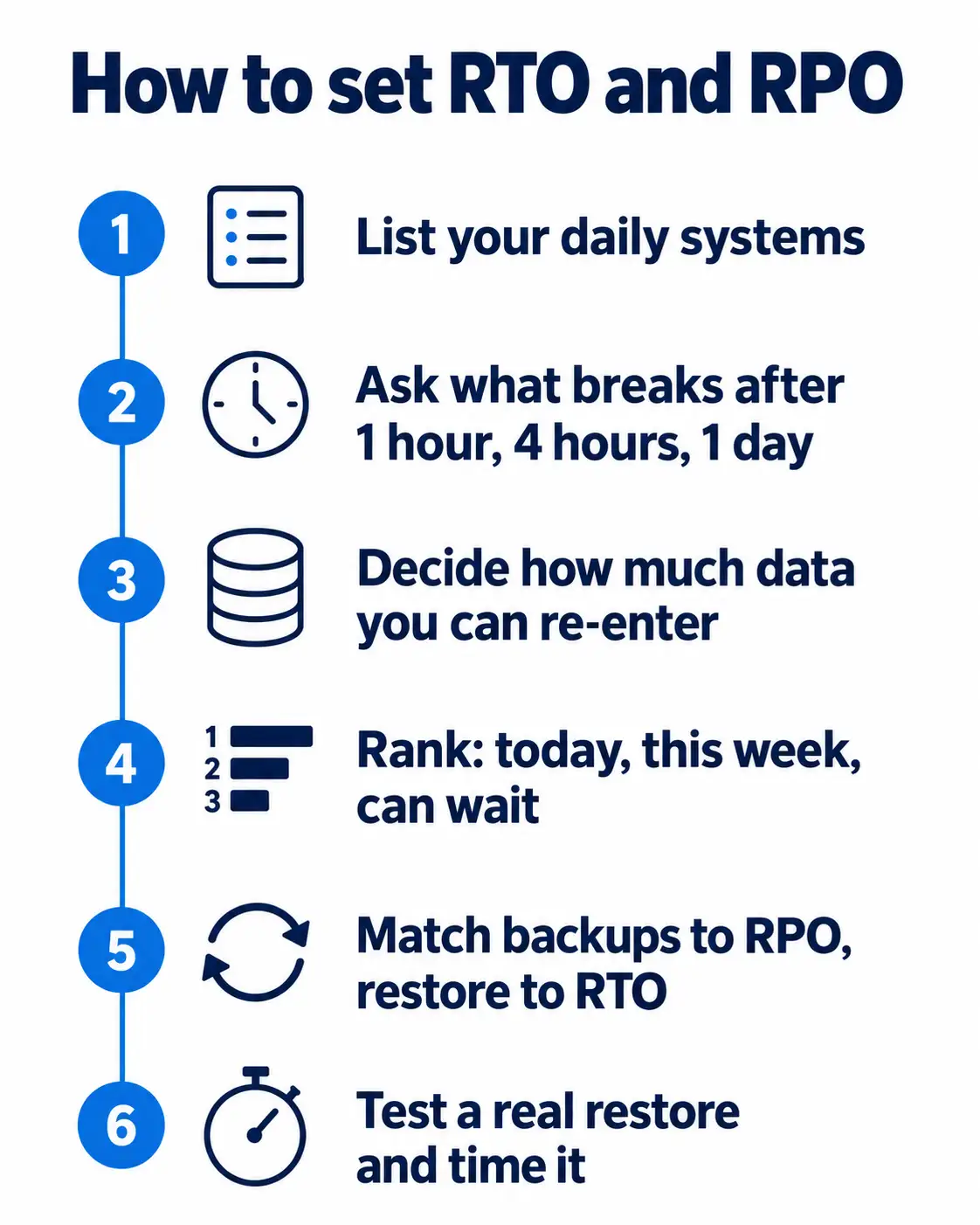
Most owners can set solid first targets in about an hour with a notepad and their office manager. What you’re doing is a short business impact analysis (BIA), which simply means ranking your systems by what each one costs you when it goes down.
- List every system your team uses each day: email, files, accounting, your main business app, phones, website.
- Ask what breaks, and who sits idle, after 1 hour, 4 hours, and 1 day without each system.
- Ask how much re-entry work you could absorb if you lost the last hour, or the last day, of data.
- Rank each system: must have today, needed this week, or can wait.
- Match backup frequency to your RPO and restore method to your RTO.
- Test a real restore, time it, and adjust your targets to what you can prove.
Step 6 gets skipped more than any other. Until you’ve timed a real restore, your targets are educated guesses.
RTO and RPO Examples for a 10 to 250 Person Business
Use the table below to start the conversation with your IT team. We built it from common recovery tiers, so treat the numbers as a first draft. Your final targets will depend on your work, your clients and any compliance rules you fall under.
| System | Typical priority | Starting RTO | Starting RPO | What it takes |
|---|---|---|---|---|
| Email (Exchange Online) | High | 4 hours | 1 hour | Point-in-time Microsoft 365 backup |
| Shared files (SharePoint, OneDrive or file server) | High | 4 to 8 hours | 1 to 4 hours | Frequent snapshots plus offsite copy |
| Accounting system | High | 8 hours | 4 hours | Image backup or vendor cloud backup |
| Main business app (practice management, ERP) | Highest | 1 to 4 hours | 15 minutes to 1 hour | Image-based backup with fast server spin-up |
| Phones (VoIP) | High | 1 hour | Not data-driven | Failover routing to cell phones |
| Public website | Medium | 24 hours | 24 hours | Host backups plus a copy you control |
For servers, we use image-based backup through Datto BDR. If a server fails, it can run straight from the backup while the hardware gets repaired. Backblaze then holds the offsite cloud copy. That combination is what makes a one- to four-hour RTO on a main business app realistic.
Tighter Targets Cost More
Each step down in RPO means backups run more often and eat more storage. Each step down in RTO means faster restore tools, standby hardware or cloud failover, and more testing time. So save your tightest targets for the systems that earn them. A 15-minute RTO on email rarely pays for itself, but on the app that runs your billing, it often does.
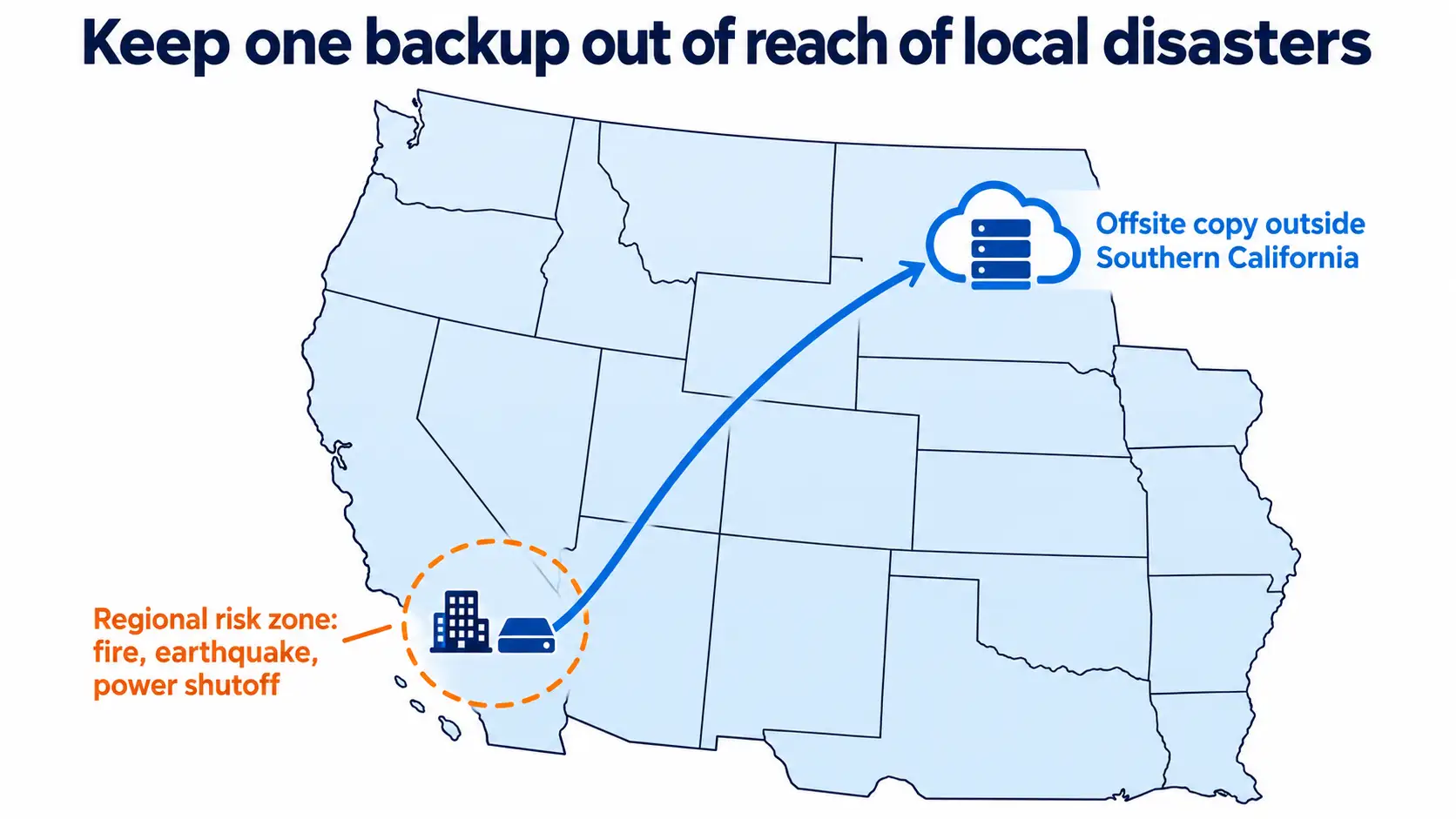
Plan for Regional Events in Southern California
Here, a single event can knock out your office and your local backup at once. Think of a planned power shutoff during fire season, an earthquake, or a wildfire evacuation order. For events like these, your RTO depends on two things:
- Keep one backup copy outside Southern California, not just in another room or another local building.
- Plan for staff to work from home or another site while the office is closed.
Does Microsoft 365 Back Up Your Data?
Only partly, and not the way most owners assume. Microsoft keeps the service running and gives you short-term tools for recovering deleted items. Keeping point-in-time copies of your own data falls to you, either through Microsoft’s paid Microsoft 365 Backup add-on or a third-party backup tool.
The three options compare like this, as of October 2026:
| Option | What it covers | Restore points | Limits |
|---|---|---|---|
| Built-in tools (recycle bin, version history, retention policies) | Deleted files and mail for a limited time | Varies by service | Microsoft’s documentation puts the SharePoint and OneDrive recycle bin at 93 days. Retention policies handle records rules, not recovery. |
| Microsoft 365 Backup (opt-in, pay per use) | Exchange Online, OneDrive, SharePoint | OneDrive and SharePoint: every 10 minutes for 2 weeks, then weekly up to 1 year. Exchange: every 10 minutes for the full year. | Priced by Microsoft at $0.15 per GB per month (as of July 31, 2024) and requires an Azure subscription. Copies stay inside Microsoft 365. |
| Third-party Microsoft 365 backup | Varies by tool | Varies by tool | Keeps a copy outside your Microsoft 365 tenant |
Restore point and retention details come from Microsoft’s Microsoft 365 Backup overview.
What this means for your planning: your Microsoft 365 RPO is set by whichever of these options you actually turned on. With the built-in tools alone, you can’t roll a whole mailbox or SharePoint site back to a specific point in time.
You may also see blogs quote a line from Microsoft’s Services Agreement telling you to back up your data. That agreement covers Microsoft’s consumer services. For business accounts, the clearer signal is that Microsoft sells Microsoft 365 Backup as a separate, paid product.
Our Microsoft 365 management team can help you pick and set up the right option.
DR Plan Template for Small Businesses: Start With This Worksheet
Your first disaster recovery (DR) plan can fit on one page. Start with the table below, copy it into a spreadsheet, and fill in a row for each system from your list.
| System | Owner | What it’s used for | Max downtime (RTO) | Max data loss (RPO) | Where backups live | Last restore test | Result |
|---|---|---|---|---|---|---|---|
| Shared files | |||||||
| Accounting | |||||||
| Main business app | |||||||
| Phones | |||||||
| Website |
With the table filled in, round out the plan with these sections:
- Name who can declare a disaster and start the plan.
- List contacts: staff, IT provider, insurer, key vendors and software support lines.
- Write how you’ll reach staff and clients if email and phones are down.
- Set the recovery order, starting with your highest-priority system.
- Store license keys, vendor account details and a printed copy of the plan offsite.
- Schedule restore tests and plan reviews.
If you’d like a longer template to build on, the Ready Business toolkits on Ready.gov are free. To see how a DR plan fits inside a wider plan, read our guide to business continuity vs disaster recovery.
How Often Should You Test Your RTO and RPO?
We recommend testing a full restore at least once a quarter, plus after any major change to your servers, software or Microsoft 365 settings.
Federal guidance points the same way. The CISA #StopRansomware Guide tells organizations to keep offline, encrypted backups and test them regularly in a recovery scenario. Ransomware often goes looking for any backup it can reach, so a copy you haven’t tested may not be usable when you need it.
If you handle patient data, HIPAA adds a formal requirement. The Security Rule’s contingency plan standard (45 CFR 164.308(a)(7)) covers data backup, disaster recovery, emergency operations and testing.
For every test, record three things:
- Time how long the restore took (your RTA).
- Check the date of the newest clean restore point (your real RPO).
- Confirm users could log in and work, beyond just getting files back.
RTO and RPO FAQ
Can RPO be longer than RTO?
Yes. The two measure different things, so they’re set independently. RPO covers the data you lose before the failure, while RTO covers the time you’re down after it. A business might restore a server within an hour (RTO) from a backup that’s a full day old (RPO).
What is a reasonable RTO for a small business?
It depends on the system. Ask what breaks after 1 hour, 4 hours and 1 day without it. Your main business app may need an RTO of a few hours, while your website may be fine at a day. Set a target for each system, then test to see if you can meet it.
Is everything in OneDrive backed up?
No. Version history and the recycle bin let you recover recent changes and deletions, but they work more like an undo button than a backup. Deleted items leave the recycle bin after 93 days. For a true point-in-time restore, you need Microsoft 365 Backup or a third-party backup tool.
Who is responsible for backing up Microsoft 365 data?
Your business is. Microsoft keeps the service available and offers short-term recovery tools, but protecting your data from deletion, ransomware or a bad sync is your responsibility. You can cover it with Microsoft’s paid Microsoft 365 Backup add-on or a third-party tool.
How do you calculate RPO?
Start with the time between your scheduled backups, which gives you your planned RPO. Then check when your last successful backup actually finished. If backups run hourly but the last clean one completed three days ago, your RPO right now is three days.
Your Next Step
Pick your three most important systems this week. Write down an RTO and RPO for each, then restore one and time it. If the result doesn’t match your targets, you’ve found the first thing to fix.
If you’d like help running that first test, our data backup and recovery services start with exactly this review.