

Ready to transform your IT experience? Reach out to our experts to discuss how our tailored solutions can meet your business needs and keep your technology running smoothly.
Business Continuity and Disaster Recovery: How BC and DR Plans Differ and Work Together
Originally published October 7, 2020. Last updated November 2, 2026.
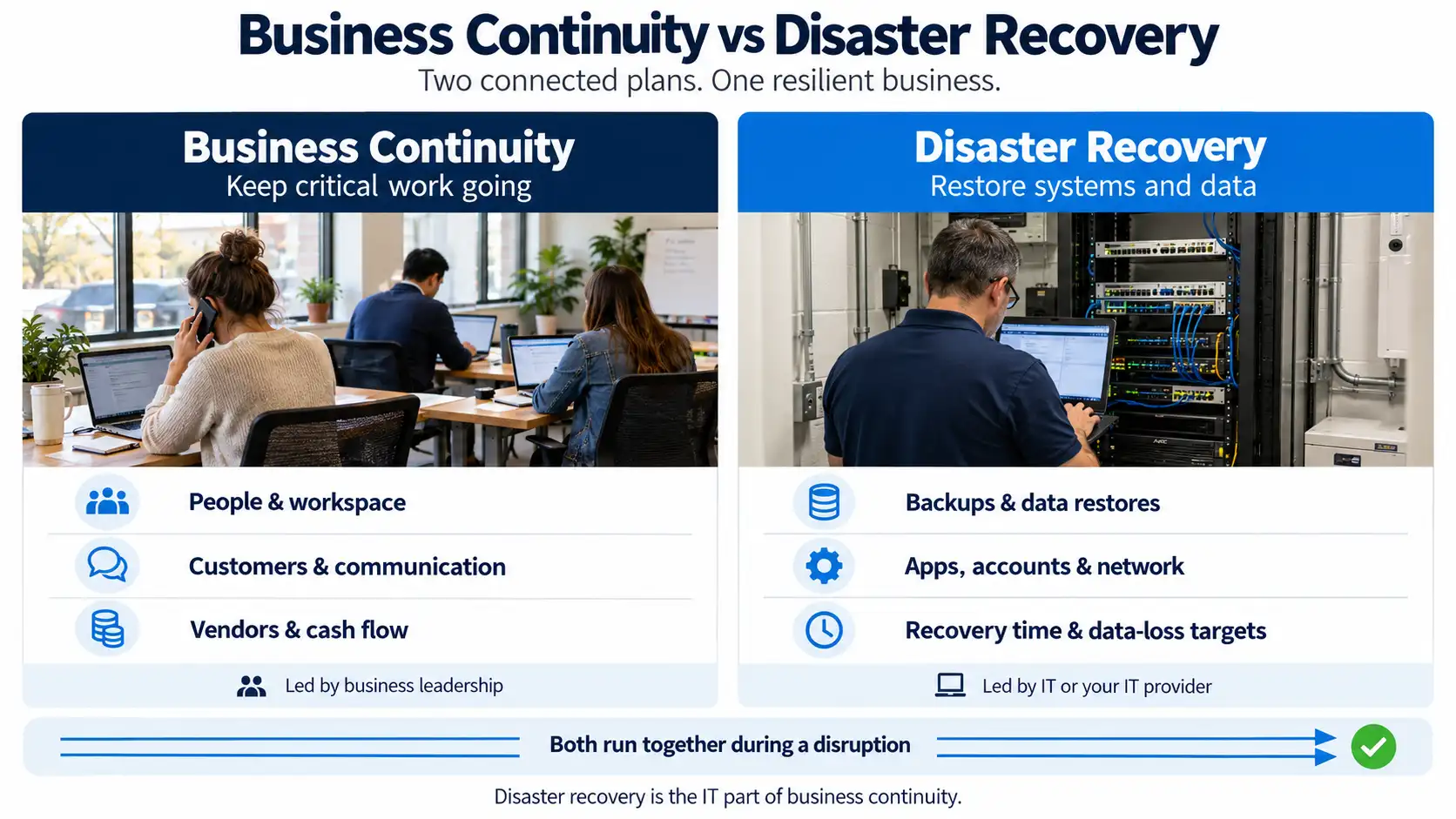
Business continuity and disaster recovery (BCDR) are two linked plans for surviving a disruption. Business continuity keeps the whole business running during the event: people, customers, vendors and cash flow. Disaster recovery is the IT part. It restores systems and data after the event, within time limits you set in advance. You need both.
This guide is for owners and operations managers, not IT staff. You’ll get a side-by-side table, what goes in each plan, how both work in a real outage, and a simple rule for what to build first.
What Is Business Continuity and Disaster Recovery (BCDR)?
Business continuity and disaster recovery is one program with two jobs. The continuity side keeps critical work going while something is broken. The recovery side brings your technology back to normal. Disaster recovery sits inside business continuity. It is the part that covers IT.
The U.S. government’s planning guide for information systems, NIST SP 800-34 Rev. 1, treats IT contingency planning the same way: as one piece of a larger resilience effort.
What is business continuity?
A business continuity plan is a playbook for running the company when normal operations stop. It answers plain questions. Who decides? Where do people work? How do customers hear from you? Which jobs must keep going, and which can wait a week?
It starts with a business impact analysis (BIA). That’s a short study of each process: what it costs you per hour or day to lose it, and how long you can go without it.
What is disaster recovery?
A disaster recovery plan is the IT playbook. It lists your systems and data, ranks them, and spells out how to restore each one and how fast. It covers servers, cloud apps, user accounts, phones and the network.
Many companies get this part through backup and disaster recovery services from an IT provider. Larger IT teams sometimes call the same work IT service continuity management (ITSCM).
Business Continuity vs Disaster Recovery: Key Differences
| Business continuity | Disaster recovery | |
|---|---|---|
| Scope | The whole business | IT systems and data |
| Main goal | Keep critical work going | Restore technology to normal |
| When it runs | From the first minute work stops until normal returns | From the moment IT is hit until systems are restored and checked |
| Who owns it | Owner, COO or office manager | IT lead or your IT provider |
| Key time measure | Maximum tolerable downtime per process | RTO and RPO per system |
| What it covers | People, workspace, customers, vendors, cash, communication | Backups, restores, accounts, servers, cloud apps, network |
| How you test it | Tabletop exercise, call tree test | Restore test, failover test |
The two plans overlap in time. That’s where much of the online confusion comes from. Continuity starts the moment work is disrupted. Recovery starts once IT is affected. Both run at the same time until your systems are back and your team is working normally again.
Two terms in the table need a plain definition. RTO (recovery time objective) is how long a system can be down. RPO (recovery point objective) is how much recent data you can afford to lose. Here’s a deeper look at how RTO and RPO work.
How Business Continuity and Disaster Recovery Are Alike
- Both start with impact. You can’t plan either one until you know which processes and systems matter most.
- Both protect critical work first. Payroll and client delivery come before the shared photo folder.
- Both fail if no one tests them. A plan that has never been tried is a guess.
- Both need an owner and a review date. Staff, vendors and software change. The plan has to keep up.
Business Continuity Plan vs Disaster Recovery Plan: What Goes in Each
What a business continuity plan includes
- Assess your risks. List what could stop work: power loss, fire, flood, ransomware, a key person leaving, a vendor going down.
- Run a business impact analysis. For each process, note the cost of downtime and the longest gap you can survive.
- Choose continuity strategies. Decide on workarounds: remote work, a backup location, manual forms, a second supplier, a customer message template.
- Test and update. Walk through the plan with your team. Fix what breaks. Repeat on a schedule. The finished document is usually short. It holds roles and backups for each role, a call tree (who calls whom, in what order), your critical processes, and the workaround for each.
What a disaster recovery plan includes
- List your systems and data. Include cloud apps like Microsoft 365, not just the server in the closet.
- Rank them by business impact. Use the BIA from your continuity plan.
- Set an RTO and RPO for each system. These numbers drive how you back up and how much you spend.
- Choose backup and recovery methods. Match each system to a method that meets its targets. This guide on choosing a backup solution covers the options.
- Write step-by-step runbooks. A runbook is a checklist for restoring one system. It starts with assessing the damage and ends with confirming users can work.
- Test your restores. A backup only counts once you’ve restored from it. Here is a common starting point for RTO and RPO targets at a 10 to 250 person company:
| Tier | Example systems | RTO | RPO |
|---|---|---|---|
| Tier 1 | Email, main business app, phones | 4 hours | 1 hour |
| Tier 2 | File shares, accounting | 24 hours | 24 hours |
| Tier 3 | Archives, old projects | 3 days | 1 week |
Your numbers will differ. At AllSafe IT, we set RTO and RPO targets with each client during onboarding.
How BC and DR Work Together in a Real Disruption
Composite example, not a single client. A 40-person professional services office opens on Monday. One employee clicked a phishing link on Friday. The file server and every synced folder are encrypted.
Business continuity lane:
- Leadership activates the plan and names one decision maker.
- Staff switch to cloud email and a paper intake log for new requests.
- The office manager runs the call tree. Everyone knows by 9:30.
- Clients get a short, honest notice by noon. Disaster recovery lane:
- IT disconnects infected machines from the network.
- The team confirms the offline backup is clean.
- They rebuild the file server and restore client folders first, archives last.
- Every Microsoft 365 password and MFA method is reset before staff log back in. Neither lane works alone. Recovery without continuity means a week of lost billing. Continuity without recovery means workarounds that never end.
Southern California adds risks of its own. Here’s how each plan responds:
| Scenario | Business continuity response | Disaster recovery response |
|---|---|---|
| Public Safety Power Shutoff (planned outage during fire risk) | Staff work from home, phones forward to mobiles | Cloud systems keep running; on-site gear shuts down cleanly on battery |
| Earthquake damages the office | Temporary workspace, staff safety check-in | Restore from offsite backup to cloud or new hardware |
| Wildfire evacuation zone | Close the office, move work remote | Confirm remote access and laptop backups |
| Microsoft 365 outage | Switch to phone and text for urgent client work | Monitor the vendor, nothing to restore on your side |
| Faulty vendor update | Prioritize which staff get fixed first | Roll back or repair affected machines |
| Key person leaves suddenly | Backup person takes over the role | Transfer account access and passwords |
That vendor row is not hypothetical. In July 2024, a faulty CrowdStrike security update crashed about 8.5 million Windows devices, according to Microsoft. No attacker was involved. Companies with a plan for “our computers won’t boot” got back first.
Why Backups Alone Are Not a Disaster Recovery Plan
Having backups is the floor, not the plan. Ransomware made that clear.
- Attackers go after backups first. CISA’s #StopRansomware Guide warns that many ransomware variants hunt for accessible backups to delete or encrypt them. Keep at least one copy offline or immutable (unchangeable once written).
- Contain before you restore. If the attacker still has access, restoring just hands them clean files to encrypt again.
- Recover accounts, not just files. Your Microsoft 365 and Entra ID (Microsoft’s login system) accounts are part of the recovery. Deleted users and groups only stay in Entra ID’s recycle bin for 30 days, per Microsoft’s documentation.
- Cloud retention is not backup. Microsoft keeps your data running. Getting back last month’s version of a deleted folder is your job. A simple rule many IT teams use: three copies of your data, on two types of storage, with one offsite. If you suspect an attack is already underway, start with what to do after a breach.
Why Business Continuity and Disaster Recovery Planning Matters
The obvious reason is getting back to work faster. Most owners find the other reasons arrive sooner.
- Clients ask. Larger customers often send vendor questionnaires about backups and recovery.
- Insurers ask. Cyber insurance applications commonly ask how you back up and how fast you can restore.
- Regulators are moving. HHS proposed an update to the HIPAA Security Rule in December 2024. It would require written procedures to restore certain systems and data within 72 hours. As of November 2026, it is still a proposal. Medical, dental and other healthcare offices should plan for it anyway.
- Your team stays calm. People handle a bad day far better when they know their role.
Which Should a Small Business Build First?
Use one test. Take your most important system. How long would a full restore actually take? Now compare that to how long the business can go without the process that depends on it.
If the restore takes longer, fix disaster recovery first. Your backup setup can’t meet the business need. If the restore is fast enough, build the continuity side first. The tech is fine, and the gap is people and process.
Most 10 to 250 person companies can get a working first version in place with these steps:
- Name one owner for the whole BCDR program.
- List your five most critical business processes.
- List the systems each one depends on.
- Set an RTO and RPO for each system.
- Confirm at least one backup is offline or immutable, and restore from it once.
- Write a one-page call tree.
- Schedule your first tabletop exercise.
How to Test Your BCDR Plan
| Test type | What it proves | Who joins | What we recommend to clients |
|---|---|---|---|
| Tabletop exercise | People know their roles and the plan makes sense | Leadership, department heads, IT | Twice a year |
| Backup restore test | Backups work and meet your RPO | IT or your IT provider | Every quarter for Tier 1 systems |
| Failover test | You can hit your RTO under real conditions | IT, one or two business users | Once a year |
| Call tree test | Everyone can be reached fast | All staff | Twice a year and after staff changes |
A tabletop exercise is a one-hour meeting where you walk through a scenario, like “the office lost power for three days,” step by step. ISO 22301, the international standard for business continuity, requires organizations to exercise and test their plans. Small companies can do it in an afternoon.
Frequently Asked Questions
Is disaster recovery part of business continuity?
Yes. Disaster recovery is the IT piece of business continuity. Continuity covers the whole business: people, customers, vendors and workspace. Disaster recovery covers restoring systems and data. A complete plan has both, and the recovery targets come from the continuity plan’s impact analysis.
Is business continuity the same as disaster recovery?
No. They’re related but different. Business continuity keeps critical work going during a disruption. Disaster recovery restores technology after it fails. You can have great backups and still lose a week of work if no one knows how to keep serving customers in the meantime.
What does BCDR mean in IT?
BCDR stands for business continuity and disaster recovery. In IT, it usually means the backups, failover systems and recovery runbooks that bring technology back after an outage. It also covers the planning that decides which systems come back first and how fast.
What is the difference between IT service continuity management and disaster recovery?
IT service continuity management (ITSCM) is the ongoing practice of keeping IT services available, including planning, risk review and testing. Disaster recovery is the specific set of steps used to restore systems after a major failure. ITSCM is the program. Disaster recovery is one of its tools.
In disaster recovery planning, what is the ultimate goal?
The goal is to restore critical systems and data within the time and data-loss limits the business agreed on in advance. Those limits are your RTO and RPO. A plan succeeds when it meets them in a real event, not just on paper.
Who is responsible for business continuity vs disaster recovery?
Business continuity belongs to leadership, usually the owner, COO or office manager. Disaster recovery belongs to IT. For many small companies, that means an outside IT support team that runs backups, tests restores and leads the technical recovery.
Your Next Step
Pick one critical system this week and do a test restore. Time it. Compare that number to how long the business can go without it. That one test will tell you which side of your plan needs work first.