


Ready to transform your IT experience? Reach out to our experts to discuss how our tailored solutions can meet your business needs and keep your technology running smoothly.
Help Desk vs Service Desk: What Small Offices Need
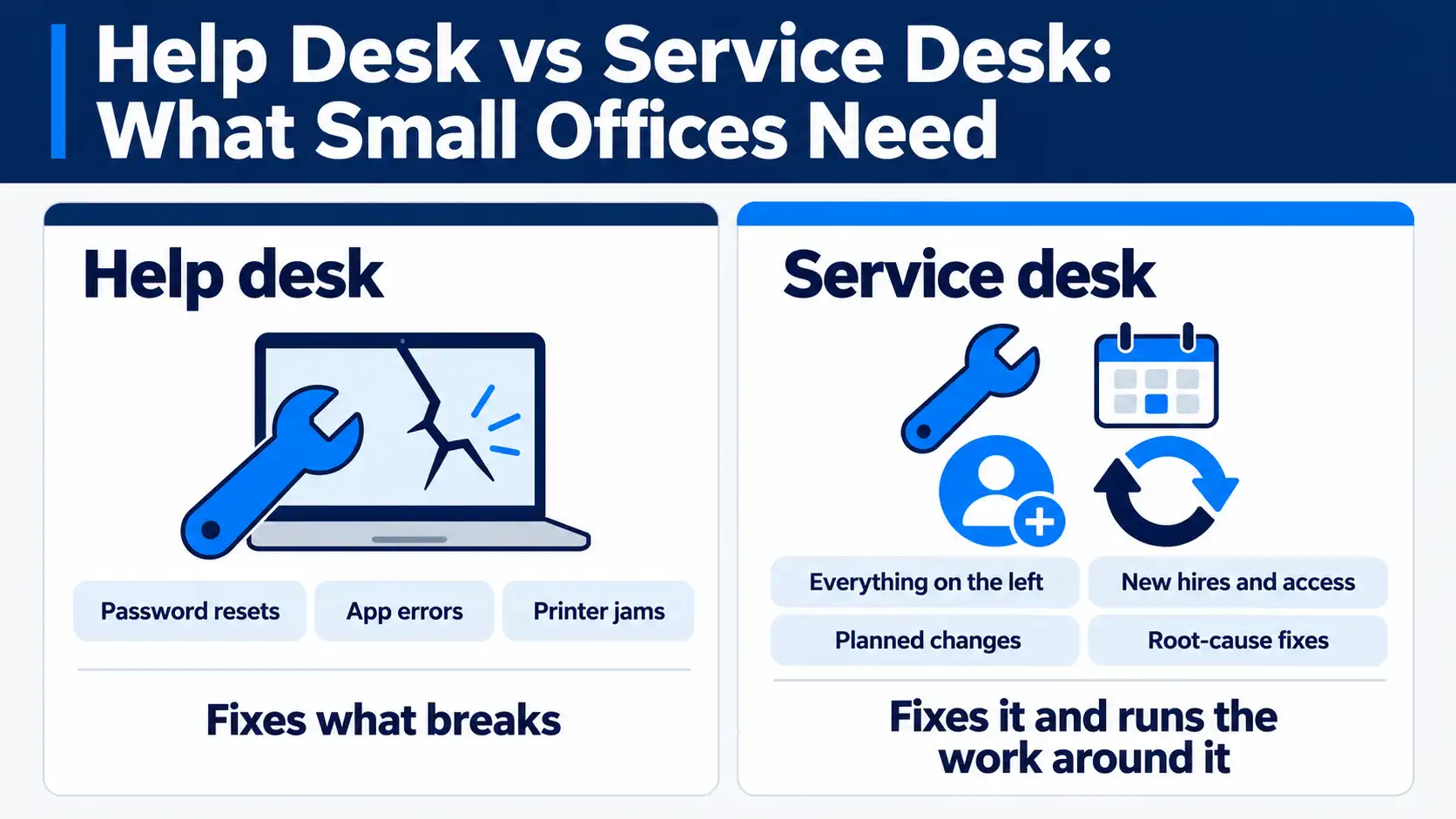
Ask five IT providers to explain help desk vs service desk and you’ll get five versions. Here’s the one we give clients. A help desk fixes problems as they come up, like a locked account or a frozen laptop. A service desk handles those same fixes, then runs the work around them: new-hire setup, software requests, planned changes and fixing repeat issues at the source.
Most offices with 10 to 50 people need both, usually from the same provider. If you’re an office manager comparing outsourced help desk support and the proposals all sound alike, this guide will help you read between the lines. We’ll cover how the two differ in a normal work week, how to tell which one you need, and 10 questions to ask a managed service provider (MSP), the outside company that runs your IT for a monthly fee.
What is the difference between a help desk and a service desk?
Think of a help desk as the team you call when something breaks. Someone reports a problem, a technician fixes it, and the ticket closes. It’s reactive by design, and for a lot of daily issues that’s exactly right.
A service desk does the same repair work but also looks ahead. It handles requests that aren’t problems at all, like giving a new hire access to the shared drive. It schedules changes so they don’t break anything, and it notices when the same issue keeps coming back.
| Help desk | Service desk | |
|---|---|---|
| Main job | Fix what’s broken | Run IT as a service for your staff |
| Typical requests | Password resets, app errors, printer jams | All of those, plus new hires, access changes and software installs |
| Approach | Reactive | Reactive and planned |
| Process | Often informal | Usually based on ITIL practices |
| What gets measured | Tickets closed, response time | Response time, resolution time, request time and repeat issues |
| Best fit | Small teams with simple setups | Growing offices with regular hires and changes |
You’ll see ITIL mentioned a lot. It’s a widely used set of IT service practices, and you don’t need to learn it. You only need to know whether your provider follows something like it.
What a help desk does
The U.S. Bureau of Labor Statistics files help-desk technicians under computer user support specialists. Their work centers on figuring out what went wrong and walking the user through the fix. In a typical office, that means the help desk will:
- Reset passwords and unlock accounts
- Fix email and app errors in tools like Microsoft 365
- Troubleshoot laptops, printers and Wi-Fi
- Log each issue in a ticketing system, the software that tracks every request from open to closed
What a service desk does
In ITIL terms, the service desk is the single point of contact for everyone who uses your systems. It takes in two kinds of work: incidents, where something broke, and service requests, where someone needs something. Day to day, a service desk adds these jobs:
- Set up new hires with accounts, licenses and a ready laptop
- Remove access the day someone leaves
- Handle requests for software, shared folders and permissions
- Plan changes, like a software rollout, so they don’t disrupt work
- Trace repeat tickets to the root cause and fix it once
- Keep a knowledge base so common fixes are written down
- Report on trends, not just ticket counts
One week, two desks: how each handles a 25-person office
Picture a single week at a 25-person firm and run it through both models.
| Event | Help desk | Service desk |
|---|---|---|
| Staff member locked out of Microsoft 365 | Verifies the caller and resets the password | Same fix, same speed |
| New hire starts Monday | Creates accounts once someone asks | Has accounts, license, laptop and access ready before day one |
| Laptop dies before a client meeting | Troubleshoots and replaces it | Same fix, plus checks records for other aging machines |
| Office adopts a new accounting app | Answers questions after launch | Plans the rollout, tests it, trains staff, then switches over |
| Same printer ticket for the third time this month | Fixes it again | Flags the pattern, finds the cause, fixes it for good |
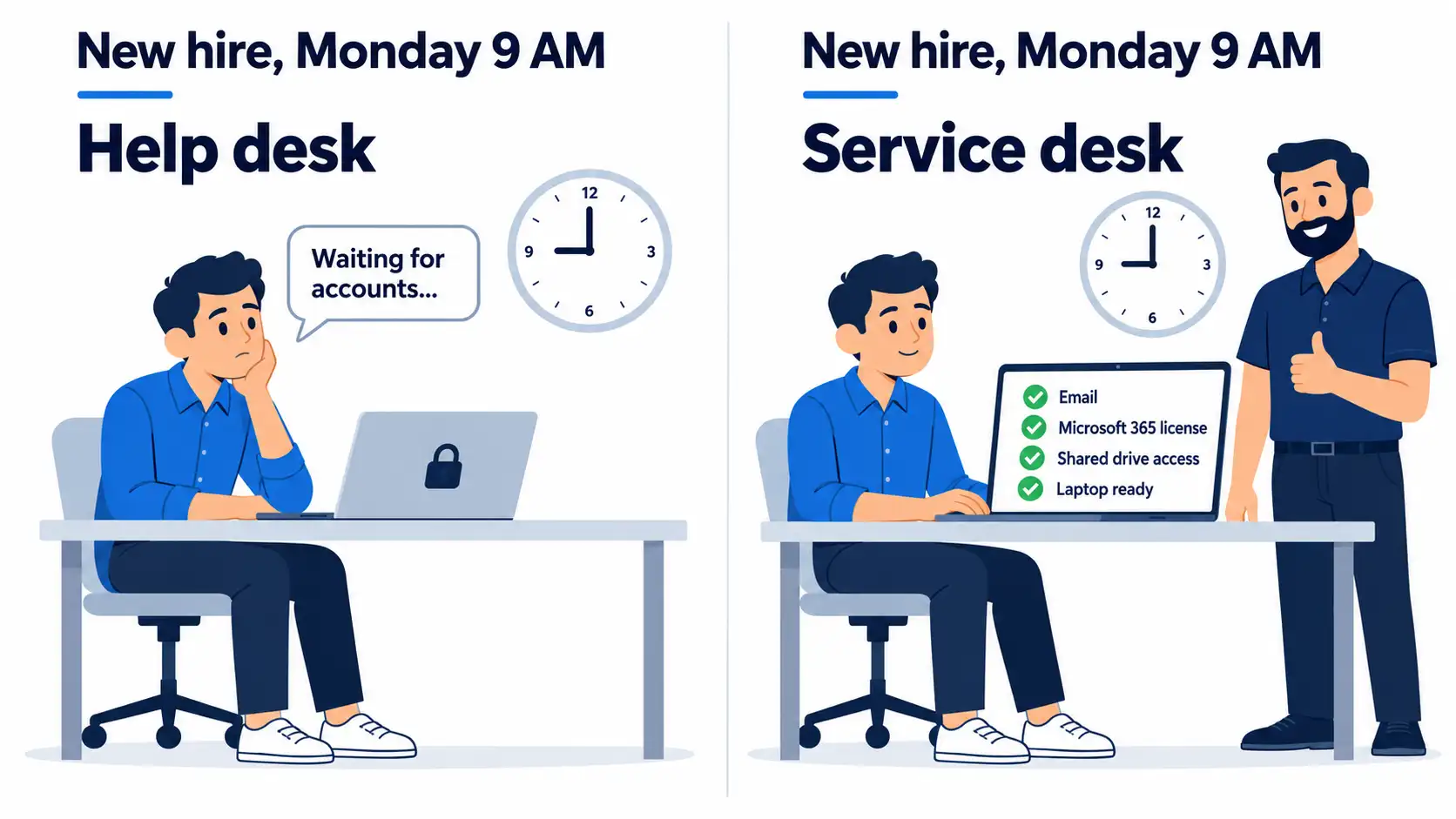
For the lockout and the dead laptop, you’d barely notice which model you had. The other three rows tell the story. Those are the moments when a new hire sits idle on day one, or a rollout eats a Friday afternoon. Over a year, that adds up to a lot of lost hours nobody tracks.
What we usually find when a new office signs on
The first couple of weeks with a new client are mostly cleanup. We take stock of every device, account and license, and the same few gaps show up almost every time.
Former employees still have working email accounts, sometimes a year or more after they left. Three or four people share one admin password, saved in a browser or a spreadsheet called something like “logins.” Nobody can tell us who has access to what. And whatever notes the last provider kept are buried in one person’s inbox.
The previous help desk usually wasn’t doing a bad job. Tickets got answered and closed. What was missing was service desk work. No one owned onboarding, offboarding or documentation, so small misses quietly piled up for years.
Why MSP proposals blur the two terms
Providers use these words loosely, and that makes comparing quotes harder than it should be. We’ve seen plans labeled “help desk” that include onboarding and change work. We’ve also seen “service desk” plans that are tickets and nothing else.
So skip the label and ask for the list. Which requests and processes are included, and which ones cost extra? If you want the mechanics of support tiers and pricing models, our guide on how help desk outsourcing works and what it costs goes deeper.
Which one does your office need?
A help desk alone can work if
- You have a handful of users
- Your team runs a few standard apps
- You rarely hire, promote or reassign people
- You don’t handle regulated data, like health or financial records
Signs you’ve outgrown a help desk
- Track how often the same issue comes back each month
- Count how many days new hires wait for accounts and a laptop
- Check whether former employees still have access
- List software updates or changes that broke something
- Ask whether anyone reports trends to you, or only closes tickets
If two or more of those hit close to home, you need service desk work, whatever the plan happens to be called.
What it costs to build it in-house
Hiring your own help desk person costs more than the salary line suggests. The Bureau of Labor Statistics puts the median annual wage for computer user support specialists at $61,860 as of May 2025. Benefits, software, training and backup coverage all sit on top of that.
Then there’s coverage. One person can’t answer the phone at night, on weekends, on vacation or when they’re out sick. If you already have an IT person who needs backup rather than a replacement, co-managed IT lets them share the load with an outside team.
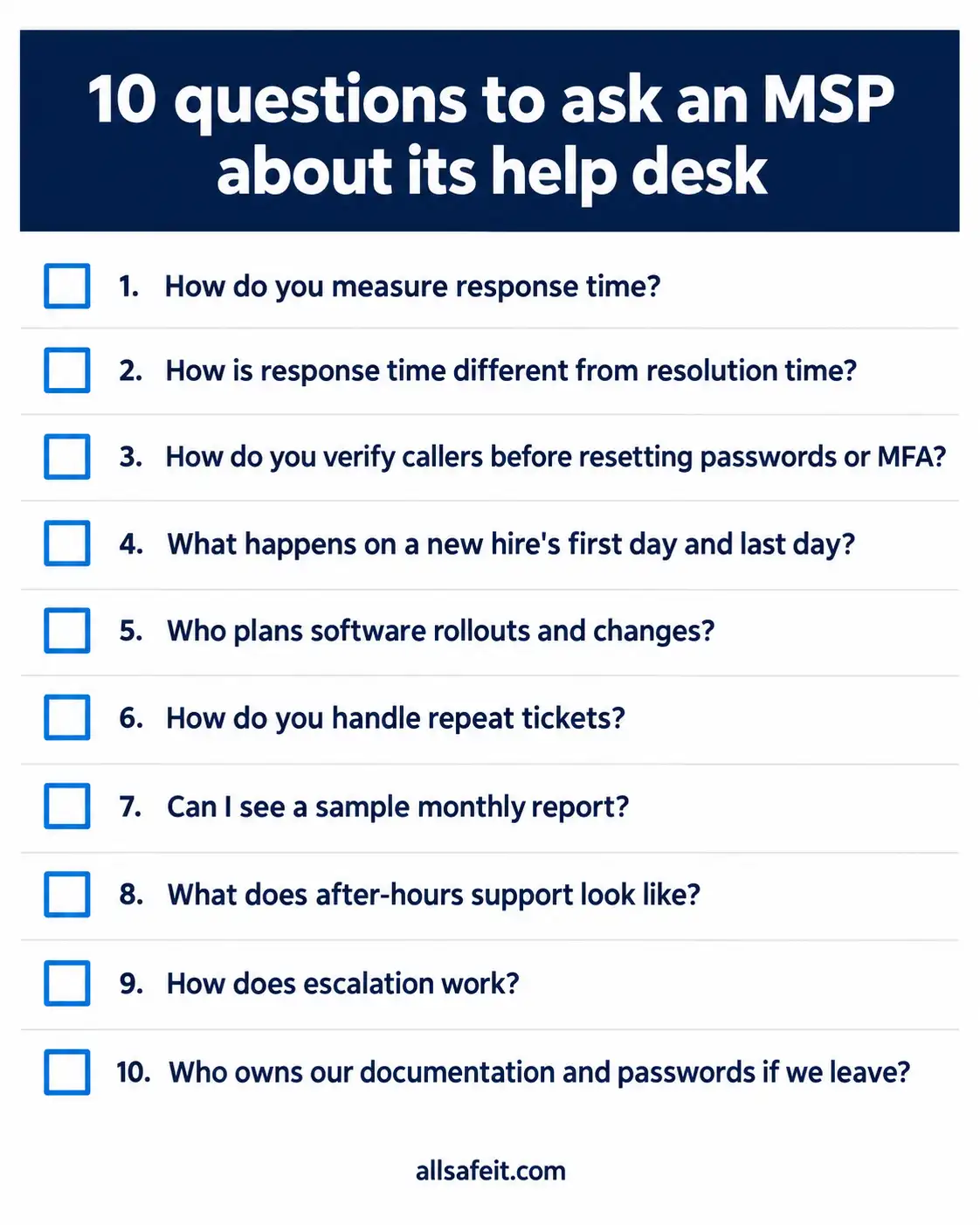
10 questions to ask an MSP about its help desk
Bring these to every provider call. Next to each one is what a good answer sounds like.
- Ask how they measure average response time. You want a specific number, timed from when you report an issue to when a person starts on it. An auto-reply email doesn’t count.
- Ask how response time differs from resolution time. Both belong in the SLA (service level agreement), the part of the contract that sets support targets. Look for separate targets by priority level, in writing.
- Ask how they verify a caller before resetting a password or MFA. Attackers call help desks pretending to be employees, then ask to have the password reset and the multi-factor authentication (MFA) moved to a new phone. A joint CISA and FBI advisory, last updated July 2025, describes this exact play. A good provider has a set process, like a callback to a number on file or a manager’s sign-off.
- Ask what happens on a new hire’s first day and an employee’s last day. Listen for a checklist with a set lead time, plus same-day access removal.
- Ask who plans changes like software rollouts. A solid answer names a person and covers a schedule, a test and a way to roll back.
- Ask how they handle repeat tickets. They should dig for the cause and tell you what they changed.
- Ask to see a sample monthly report. Look for ticket trends, response and resolution times, and open risks.
- Ask what after-hours and weekend support looks like. You want real people on call and a clear line between what’s included and what’s billed extra.
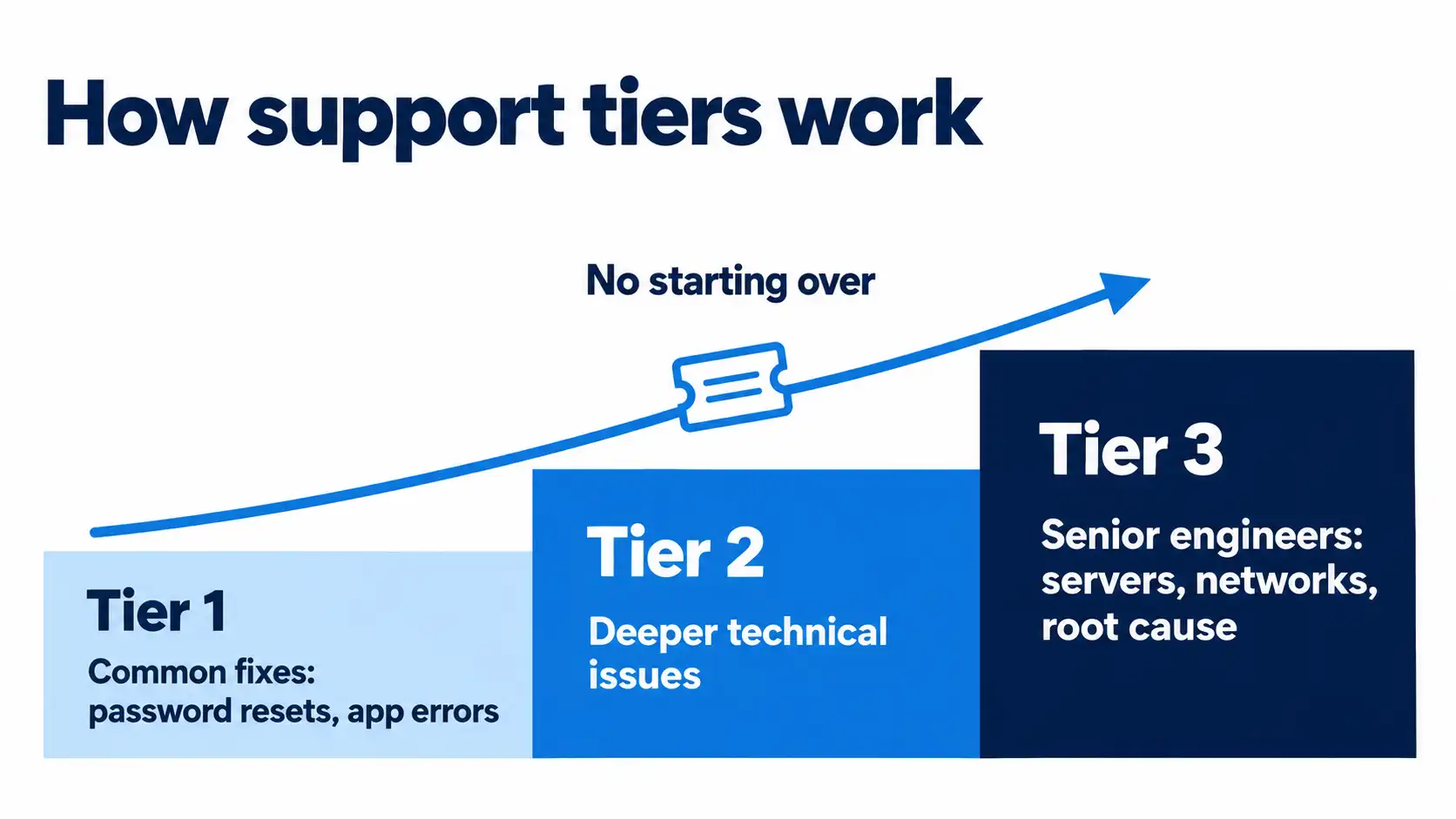
- Ask how escalation works when the first technician can’t fix it. Tickets should move up to senior engineers without you repeating your story.
- Ask who owns your documentation and passwords if you leave. The answer should be you, with everything handed over in a usable format.
How AllSafe IT runs its help desk
We’ve supported Southern California businesses since 2005, and our desk runs 24/7/365 with a 3 to 15 minute average response time. Pricing is flat per user, per month, so a busy month doesn’t change your bill.
Our support plans cover both sides of this article:
- Fix day-to-day issues across Microsoft 365, Google Workspace, Mac and Windows
- Set up new hires and remove access for people who leave
- Handle software, access and permission requests
- Plan and schedule changes and rollouts
- Trace repeat issues back to the cause
- Send regular reporting on tickets and trends
Our team holds Microsoft 365 Administrator Expert, Apple Certified Professional and Google Workspace Administrator certifications. AllSafe IT is SOC 2 compliant and a Microsoft Solutions Partner. If you already have an IT person on staff, we offer co-managed support too. Offices in the area can read more about our IT support for Los Angeles offices.
Your next step
Take the 10 questions into your next provider call and jot down each answer. Vague replies are worth noticing. If you’d like a second opinion on your current setup, our help desk support team is happy to walk through the same list with you.
Help desk vs service desk FAQ
Is a help desk part of a service desk? In most setups, yes. A service desk covers everything a help desk does, such as fixing problems and answering questions. On top of that it handles requests, planned changes and follow-up on repeat issues. Every service desk does help desk work, but not every help desk does service desk work.
Is a service desk the same as ITSM? Not quite. ITSM, or IT service management, is the whole system for planning, delivering and improving IT services. The service desk is the part your staff actually talk to. Think of it as the front door of ITSM, where problems and requests come in.
What is tier 1, tier 2 and tier 3 support? Tiers sort tickets by difficulty. Tier 1 covers common fixes like password resets. Tier 2 takes deeper technical issues. Tier 3 is senior engineers for servers, networks and root-cause work. A good desk moves tickets up without making you start over.
Does a small business need ITIL? Not the full framework. A 20-person office doesn’t need formal ITIL processes. It does benefit from the basics ITIL teaches: one place to report issues, set response targets, a checklist for hires and exits, and a habit of fixing root causes. Your provider should bring those.
What is the difference between a help desk and IT support? IT support is the broad term for any help with technology, from fixing a laptop to running your network. A help desk is one part of IT support: the team people contact when something breaks. Most managed IT plans include both.