

Ready to transform your IT experience? Reach out to our experts to discuss how our tailored solutions can meet your business needs and keep your technology running smoothly.
IT Help Desk Outsourcing: What It Is, How It Works, and When It Pays Off

IT help desk outsourcing means paying an outside provider to handle your users’ technical support tickets: password resets, software errors, account access, and device problems. You cover a set monthly or per-ticket fee instead of staffing an internal desk. For most small and mid-sized businesses, help desk outsourcing buys wider coverage, faster response, and lower fixed costs than hiring the same skills in-house.
That is the short answer. The rest of this guide shows how the model works, what it costs in 2026, how it changes your service levels, and how to tell if your business is ready for it.
What is IT help desk outsourcing?
IT help desk outsourcing is a support arrangement where a third-party team answers and resolves your employees’ IT requests. They work through your ticketing system, follow agreed response targets, and escalate anything they cannot fix. You keep ownership of your systems and data. They own the day-to-day support work.
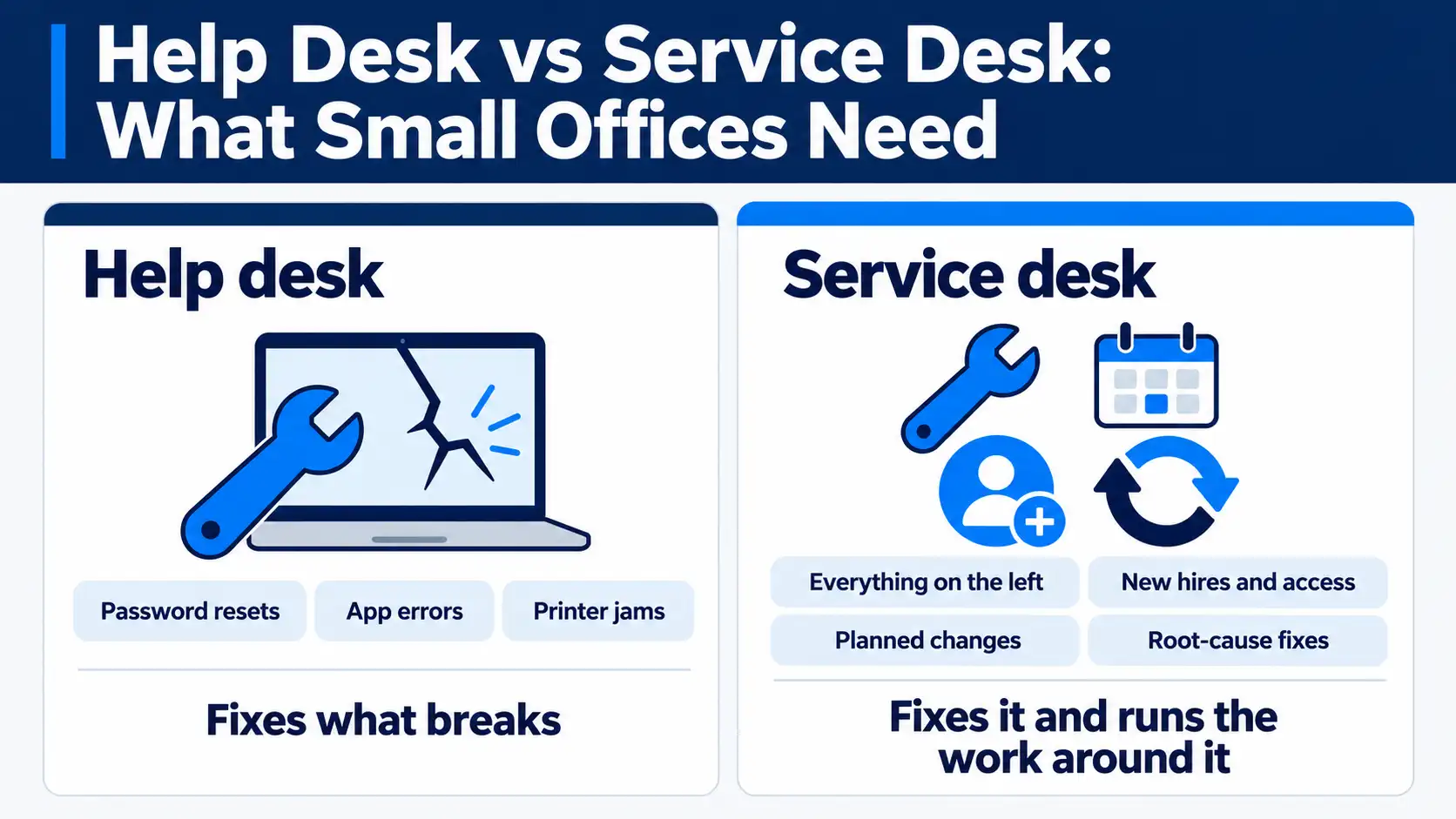
People often blur two terms here, so it helps to separate them. A help desk fixes immediate problems: a login that fails, a printer that stalls, an app that crashes. A service desk does that and also manages broader requests like new-hire setup, software rollouts, and change requests. Most SMBs start with help desk support and grow into service desk needs later.
Here is what a provider usually takes off your plate:
- Reset passwords and unlock accounts
- Set up and remove user accounts, mailboxes, and permissions
- Troubleshoot software errors and common app issues
- Support laptops, desktops, and mobile devices
- Handle connectivity, printing, and access problems
- Log, track, and report every ticket to resolution Knowing what gets handed off is step one. How the work actually flows is where the value shows up.
How does IT help desk outsourcing work?
A user reports a problem, the provider triages it, resolves what they can, and escalates the rest. That loop runs on your ticketing platform so nothing gets lost. Every request gets logged, prioritized by severity, and tracked from open to closed. You get reporting on volume, response times, and recurring issues.
The work moves through support tiers. Each tier handles a different level of complexity, and clear escalation lines keep tickets from stalling.
Support tiers explained (Tier 0 to Tier 3)
Support tiers sort requests by difficulty so the right person handles each one. Lower tiers clear simple, high-volume tickets fast. Higher tiers take the hard, rare cases.
| Tier | Handles | Example |
|---|---|---|
| Tier 0 | Self-service, no human | Knowledge base article, password self-reset |
| Tier 1 | Common, quick fixes | Login issues, basic app errors, account setup |
| Tier 2 | Deeper technical work | Configuration, connectivity, escalated bugs |
| Tier 3 | Specialist or engineer | Server, network, or root-cause fixes |
A good provider resolves most tickets at Tier 1. When a ticket needs more, it moves up without the user starting over. That routing is what keeps resolution times low.
Coverage: business hours, after-hours, or 24/7
Coverage decides when your users can get help. An outsourced desk can run standard business hours, after-hours and weekends, or full 24/7/365. The wider the window, the more you pay, so match coverage to how your people actually work.
A retail or logistics business with night shifts needs round-the-clock help. A nine-to-five office may only need after-hours backup for emergencies. Buying 24/7 when you do not need it wastes budget. Buying too little leaves users stuck at the worst moments.
Co-managed or fully outsourced
You do not have to hand off everything. Co-managed support keeps your internal IT lead in place and adds an outside team for overflow, after-hours, or Tier 1 volume. Full outsourcing hands the entire desk to the provider.
Co-managed suits businesses with one stretched IT person who needs backup, not a replacement. Full outsourcing suits teams with no internal IT or ones that want their staff focused on projects instead of tickets. Both models keep you in control of strategy. The difference is who answers the phone.
The mechanics are straightforward. The reasons businesses make the switch are more specific.
See what an outsourced help desk actually delivers
Response targets, tiered support, and clear reporting, built around how your team works.
See Help Desk SupportBenefits of outsourcing help desk services
The main benefit of outsourcing help desk services is steady coverage without the cost and risk of hiring. You get a full support team for less than the loaded cost of one or two internal hires. Here is where the value lands:
- Fix costs. Trade salaries, benefits, tools, and training for one recurring fee you can budget.
- Widen coverage. Add nights, weekends, or 24/7 without building a night shift.
- Reach more skills. Tap a team that has seen your problem before, across many clients.
- Resolve faster. Tiered routing and set response targets shorten the wait.
- Scale on demand. Add or trim capacity as headcount and ticket volume shift.
- Free your people. Let internal staff work on projects instead of resets. Turnover is the quiet win. When you own the desk, one resignation can gut your coverage. Help desk support outsourcing shifts that risk to a provider, because staffing is their job, not yours.
Benefits only hold if you go in clear-eyed about the trade-offs. Ignoring them is how outsourcing goes wrong.
The real risks (and how to avoid them)
Outsourcing can fail, and pretending otherwise helps no one. The common failure is service quality slipping to “just good enough” once a contract is signed. The fixes are specific, and you should ask about each one before you commit.
- Quality drift. Support gets slower or sloppier over time. Fix: written SLAs with response and resolution targets, reviewed monthly.
- Loss of context. An outside team does not know your business the way you do. Fix: a documented runbook and named, consistent technicians, not a random queue.
- Security exposure. Support staff touch accounts and data. Fix: least-privilege access, background-checked staff, and a provider with real security controls.
- Communication gaps. Offshore-only desks can struggle with nuance and time zones. Fix: US-based or clearly staffed coverage during your working hours.
- Weak reporting. No data means no proof. Fix: monthly reporting on volume, response, resolution, and satisfaction. Notice the pattern. Every risk has a contract or process control that cancels it out. A provider that resists those controls is telling you something.
Once you understand the risks, the in-house comparison gets much clearer.
In-house vs. outsourced help desk: how to decide
In-house gives you presence and deep context. Outsourced gives you coverage, scale, and lower fixed cost. The right call depends on your size, your hours, and how much IT you run.
| Factor | In-house desk | Outsourced desk |
|---|---|---|
| Cost | Higher, fixed | Lower, predictable |
| Coverage | Usually business hours | Up to 24/7/365 |
| Skill range | Limited to your hires | Broad, multi-client |
| Scalability | Slow to change | Flexible |
| Business context | Deep | Built over time |
| Turnover risk | Yours | The provider’s |
Choose in-house if IT is core to your product, you need hands-on-desk presence, and you can fund a full team. Choose outsourced if you want wider coverage, steadier costs, and your staff focused on higher-value work. Many businesses land in the middle with a co-managed setup.
The decision usually comes down to money, so let’s put real numbers on it.
How much does IT help desk outsourcing cost in 2026?
Outsourced help desk pricing in 2026 runs roughly $6 to $40 per ticket, with per-user and dedicated-team models also common. The rate drops as your volume rises. Setup for a basic desk usually runs $1,500 to $5,000 as a one-time transition fee.
Providers price the work a few different ways. Match the model to how your support demand behaves.
| Model | How it works | Best for |
|---|---|---|
| Per-ticket | Pay per resolved request | Variable or low volume |
| Per-user | Flat fee per employee, per month | Steady headcount |
| Dedicated capacity | Pay for set agent hours or FTEs | High, predictable volume |
| Block hours | Prepaid pool of support hours | Occasional needs |
| Hybrid | Base fee plus overage | Mixed demand |
Per-ticket rates give a useful anchor. Expect around $14 per ticket at 200 tickets a month, $7 to $10 at 1,000, and $6 to $8 at 2,000. Higher tiers and wider coverage push the number up.
Now compare that to hiring. The US median wage for a computer user support specialist was $60,340 in 2024, before benefits, software, management, and the coverage gaps a single hire cannot fill. One person also cannot cover nights, vacations, or sick days. That gap is the real cost of in-house, and it rarely shows up in the salary line.
Cost is only half the equation. The other half is what you get in return, measured by service levels.
How does help desk outsourcing affect your SLAs?
A service level agreement (SLA) sets the response and resolution targets your provider must hit. Done right, outsourcing can improve those SLAs, because the provider staffs to meet them and backs them with tiered routing and wider coverage. Done poorly, a vague SLA hides slow service behind soft words.
Read the SLA for three things:
- First response time. How fast someone answers a ticket, by severity.
- Resolution time. How fast the issue actually gets closed, by tier.
- Uptime and availability. For any systems the provider monitors or hosts. Watch the fine print. An SLA that promises a fast “response” but says nothing about “resolution” lets a provider reply quickly and fix slowly. Ask how targets differ by priority level, and ask what happens when they miss. Real backing shows up as service credits or review triggers, not apologies.
Strong SLAs protect you. Weak ones protect the vendor. That difference matters most when data and compliance are on the line.
Is your business ready to outsource its help desk?
You are likely ready if your ticket volume outpaces your internal capacity, your coverage has gaps, or your IT staff spend more time on resets than on real projects. Run through this quick check before you shortlist providers:
- Count your monthly ticket volume and after-hours needs
- List where coverage breaks down today
- Note your compliance and data-handling obligations
- Measure how much time internal IT loses to routine tickets
- Decide between co-managed and full outsourcing Compliance deserves a hard look. Under the California Consumer Privacy Act (CCPA) and its CPRA amendments, plus the CPPA’s cybersecurity audit rules taking effect in 2026, any team that touches your tickets touches regulated data. Whoever runs your desk must handle that data correctly, which makes a provider’s security controls a buying factor, not a footnote. As a Southern California managed IT provider, that is exactly the ground we work on every day. Ask any provider for their security posture in writing, and confirm they hold a current SOC 2 attestation.
If your check turns up more gaps than green lights, outsourcing is worth a serious conversation.
Not sure if outsourcing fits your team?
Bring us your ticket volume and coverage gaps. We'll give you a straight read on whether outsourcing makes sense.
Talk to Our TeamFrequently asked questions
What is the difference between a help desk and a service desk? A help desk fixes immediate technical problems like logins, apps, and devices. A service desk does that and also manages broader IT requests such as onboarding, software rollouts, and change requests. Help desk is a subset of service desk.
What is the difference between a help desk and a NOC? A help desk supports users and their tickets. A network operations center (NOC) monitors infrastructure like servers and networks in the background. One answers people. The other watches systems.
Is outsourced help desk support secure? It can be, with the right controls. Look for least-privilege access, background-checked staff, documented security practices, and a current SOC 2 attestation. Security depends on the provider, not the outsourcing model itself.
Can I keep some support in-house? Yes. A co-managed setup keeps your internal IT lead and adds an outside team for overflow, after-hours, or Tier 1 volume. It is a common middle path for growing businesses.
How fast can an outsourced help desk go live? A basic desk can launch in days to a few weeks, depending on your systems and documentation. Onboarding covers access setup, runbook handoff, and ticket routing before the team takes live calls.