

Ready to transform your IT experience? Reach out to our experts to discuss how our tailored solutions can meet your business needs and keep your technology running smoothly.
Vulnerability Scan vs Penetration Test: What's the Difference and Which Do You Need?
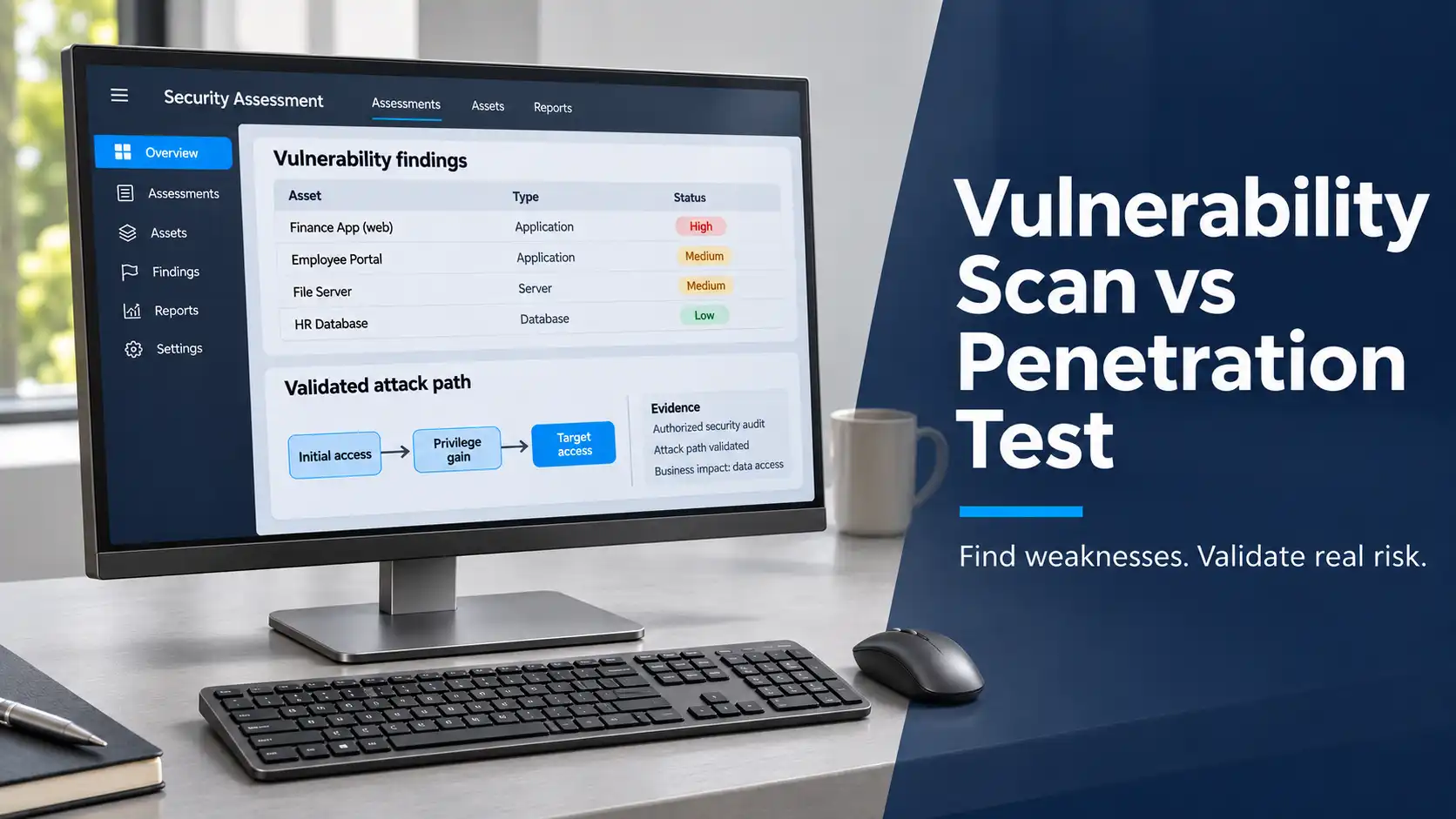
The vulnerability scan vs penetration test question comes down to one word: proof. A vulnerability scan is an automated check that flags known weaknesses across your systems. A penetration test is a hands-on attack by a skilled tester who tries to exploit those weaknesses and shows what they can reach. Scans run monthly or quarterly. Pen tests run once a year and after major changes. Most businesses need both.
So why do so many owners mix them up? The request usually arrives as one line in an email from an auditor, insurer, bank, or client, and vendors use the terms loosely. This guide settles the vulnerability assessment vs penetration test question in plain terms: what each finds, what each costs, which rules ask for which, and how to choose. AllSafe IT has run networks and security for Southern California businesses for 20+ years, and our Orange County managed IT and security team reads both kinds of reports and fixes what they find.
Vulnerability Scan vs Penetration Test: Key Differences
Think of your network as an office building. A scan walks the halls and lists every lock that looks weak. A pen test hires someone to get in, then shows you which rooms they reached and how. Same building, two different answers.
| Vulnerability scan | Penetration test | |
|---|---|---|
| Method | Automated software checks systems against known flaws | A person attacks your systems, supported by tools |
| Depth and exploitation | Flags possible weaknesses, never exploits them | Exploits weaknesses to prove real access |
| Scope and coverage | Broad: every device and IP it can reach | Narrow and deep: agreed targets and attack paths |
| Who runs it | Your IT provider or a scanning platform | An independent tester or testing team |
| Time to run | Minutes to a few hours | One to two weeks of active testing for most small businesses |
| Frequency | Monthly, quarterly, or continuous | Once a year and after major changes |
| Typical cost | Low, often bundled into managed IT | $4,000 to $35,000+ per test |
| Output | Long list of findings scored by severity | Short list of proven findings with evidence |
| False positives | Common | Rare, because each finding is proven |
| Disruption risk | Low | Low to moderate, managed by rules of engagement |
A scan tells you what’s wrong. A pen test shows what an attacker could do with it. Our full penetration test pricing guide covers pricing by test type.
The table gives you the shape. The details of each one decide which you need.
What Is a Vulnerability Scan?
A vulnerability scan is software that checks your devices, servers, and websites against a database of known flaws. It looks for missing patches, outdated firmware, open ports, weak encryption, and default passwords. Each finding gets a severity score, usually from the Common Vulnerability Scoring System (CVSS). A network scan of a small office takes minutes to a few hours.
The scanner does not try to break in. It knocks, reads the version number on the door, and compares it to a list of doors known to fail.
Internal vs External Vulnerability Scans
An external scan looks at what the internet sees: your firewall, VPN, email gateway, website, and public IP addresses. An internal scan runs from inside your network and covers laptops, servers, printers, switches, and Wi-Fi gear. You need both. Most real attacks start outside and finish inside.
Credentialed vs Uncredentialed Scans
An uncredentialed scan looks at each device from the network, like a stranger would. A credentialed scan logs in and checks installed software, settings, and patch levels directly. Credentialed scans find far more, with fewer false alarms. PCI DSS 4.0.1 now requires authenticated internal scans for businesses that handle card data.
What a Vulnerability Scan Report Looks Like
Expect a long list. A 50-person office can easily produce a few hundred findings on a first scan. Each line names the device, the flaw, a CVSS score, and a suggested fix, usually grouped into critical, high, medium, and low. Some findings will be wrong, or will apply to software you no longer run.
Limits of a Vulnerability Scan
Scans are good at volume and poor at judgment. They only find flaws that are already known and catalogued. They can’t tell whether three medium findings combine into one serious problem. They miss weak passwords, risky settings in cloud apps, and anything involving people. And a scan is a snapshot: a new flaw announced tomorrow is not on today’s report.
That last gap is why the word “assessment” shows up so often, and why it means something different.
Penetration Test vs Vulnerability Assessment: Scan, Assessment, or Test?
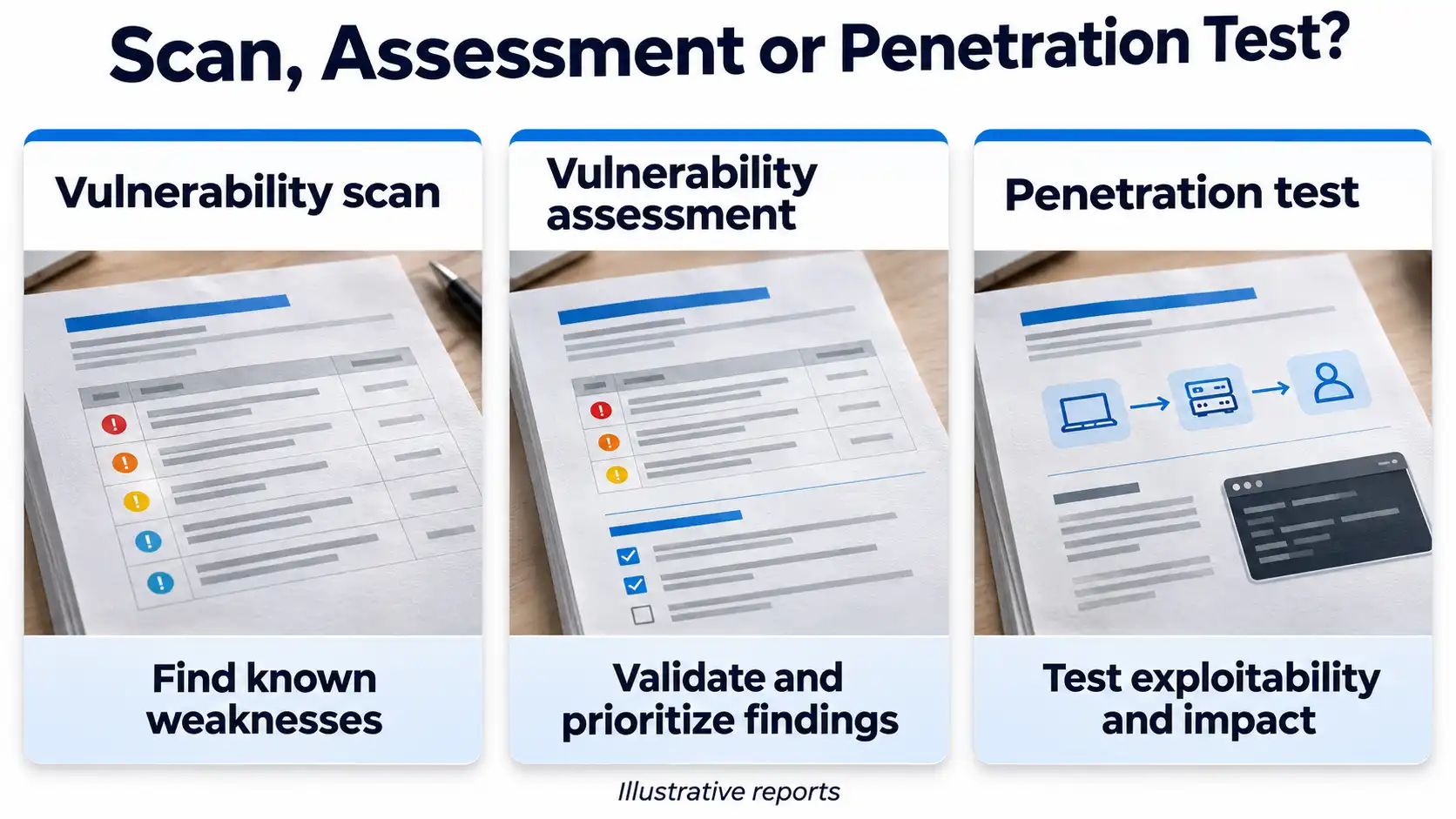
Here is where most of the confusion lives. A vulnerability scan is the raw tool output. A vulnerability assessment is that scan plus a person who checks the results, removes false positives, ranks what’s left by business risk, and writes a fix plan. A penetration test goes one step further and actually exploits the weaknesses.
| Vulnerability scan | Vulnerability assessment | Penetration test | Risk assessment | |
|---|---|---|---|---|
| Question it answers | What known flaws exist? | Which flaws matter most to us? | What can an attacker actually do? | Where is our business most exposed overall? |
| Who does it | Software | Security analyst reviewing scan data | Penetration tester | Security or compliance lead |
| Output | Raw findings list | Validated, ranked findings and fix plan | Proof of access and attack paths | Risk register and priorities |
| Typical frequency | Monthly to continuous | Quarterly to twice a year | Yearly and after major changes | Yearly |
In a penetration test vs vulnerability assessment decision, the assessment is about coverage and priority. The pen test is about proof. Some vendors call either one “vulnerability testing,” so ask which you are getting before you sign.
Proof needs a person, and that changes how the work is done.
What Is a Penetration Test?
A penetration test is an authorized, simulated attack on your systems by a skilled tester. The tester uses the same tools and tricks a real attacker would, then stops at an agreed point and documents everything. The goal is to show what someone could reach, how they would get there, and what to fix first. Every engagement starts with written permission and a signed scope.
How a Penetration Test Works
Most testers follow a recognized method such as NIST SP 800-115 or the Penetration Testing Execution Standard (PTES). The steps look like this:
- Scope and sign. Agree on targets, dates, rules of engagement, and emergency contacts.
- Gather information. Map your public footprint, staff names, email formats, and exposed services.
- Scan for weaknesses. Yes, most pen tests start with a scan. It points the tester toward likely openings.
- Exploit. Try to break in through the most promising weaknesses.
- Move and escalate. From the first foothold, try to gain admin rights and reach sensitive data.
- Report. Write up each finding with evidence, business impact, and a fix.
- Retest. Confirm the fixes worked.
Black Box, Gray Box, and White Box Testing
These are the three main types of penetration testing by how much the tester knows. Black box testers start with nothing, like an outside attacker. White box testers get full details, including network maps and admin access. Gray box sits in the middle, often with a normal user login. For most small businesses, gray box gives the best results per tester day.
Types of Penetration Tests
- External network: can someone on the internet get in?
- Internal network: what can an attacker do from one compromised laptop?
- Web application and API: can a client portal or intake form be abused?
- Cloud and Microsoft 365: are admin roles, sharing, and sign-in rules set safely?
- Wireless: can guest Wi-Fi reach company systems?
- Social engineering: will staff click, call back, or hold the door?
What a Penetration Test Report Includes
A good report has a plain-language executive summary, the scope and method, an attack narrative showing how findings were chained, each finding with proof and a severity rating, business impact, specific fixes, and retest results. Ask for an attestation letter too. That short summary is what you send to clients and insurers instead of the full report.
The attack narrative is the part a scanner can never write. It is also where most of the surprises live.
What a Clean Vulnerability Scan Misses
A scan with zero critical findings does not mean an attacker can’t get in. This is the most common misread we see, and it costs owners the most. Scanners check versions and settings against a known list. Attackers look for whatever works.
Here is what a clean scan regularly misses:
- Weak and reused passwords. Scanners rarely test real logins. Attackers try common passwords against every login page they find.
- Microsoft 365 setup gaps. Missing conditional access, admin accounts without strong MFA, and files shared to “anyone with the link” don’t show up as CVEs.
- Chained findings. Three medium issues can combine into one path to your file server.
- Business logic flaws. A client portal that lets one customer see another customer’s documents passes most scans.
- People. Phishing, MFA push fatigue, and a convincing call to the help desk are outside any scanner’s reach.
- Silent alerts. A scan never tells you whether your security tools noticed an attack. A pen test does.
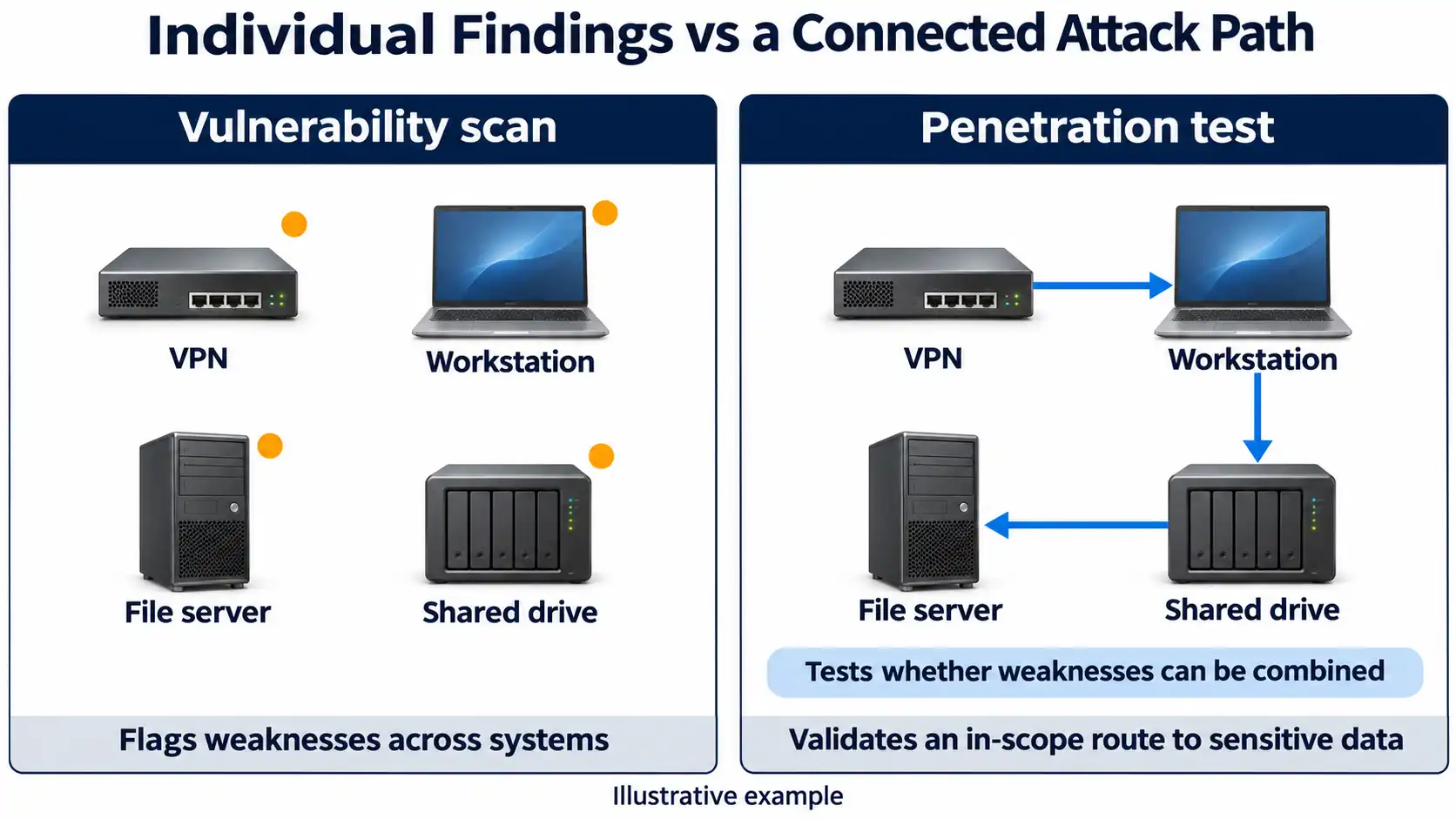
Example: Same Office, Two Reports
Here is a pattern typical of what we see. Picture a 60-person professional services firm on Microsoft 365, with offices in Los Angeles and Orange County.
The scan report listed about 140 findings. Six were critical: VPN firmware two versions behind, three servers missing monthly patches, old encryption on a printer’s web page, and a storage device with its default admin page exposed.
The pen test ignored most of that list. The tester found an old service account that could still log in to the VPN with a password alone. Once inside, the tester found that same account’s password saved in a script on a shared drive. The account had admin rights. Within two days, the tester could open the folder holding client tax files.
None of those steps showed up as critical on the scan. The fixes were simple: retire the service account, require MFA on every VPN login, remove saved passwords from scripts, and trim admin rights. The scan found real problems too. It just didn’t find the one that mattered most.
So which one should you buy first? That depends on what you’re being asked for, and it is answerable.
Vulnerability Assessment vs Penetration Test: Which One Do You Need?
Start with the exact wording of the request in front of you. If a rule or client asks for “regular vulnerability scanning,” you need scanning, ideally with a person reviewing the results. If anyone asks for proof your defenses hold, or the words “penetration test” appear, you need a pen test. Most businesses need scans all year and one pen test a year.
Four checks settle the vulnerability assessment vs penetration test decision:
- Read the request word for word. “Scan,” “assessment,” and “penetration test” are three different deliverables.
- Find the rule behind it. PCI DSS, the FTC Safeguards Rule, HIPAA, and CMMC each ask for different things (see the table below).
- Check your dates. When did you last scan? When did you last test?
- List what changed. A new office, a cloud move, a new client portal, or a merger all justify a fresh test.
Three Common Southern California Scenarios
A 15-person CPA firm in Pasadena. The FTC Safeguards Rule covers tax and accounting firms. If the firm holds customer data on 5,000 or more consumers, it needs a vulnerability assessment every six months and a pen test every year, unless it runs continuous monitoring. Below 5,000 consumers, those two items don’t apply, but scanning is still the cheapest protection the firm can buy.
An 80-person defense supplier in Orange County. CMMC Level 2 follows NIST SP 800-171, which requires periodic vulnerability scanning. It does not require a pen test. That only comes in at Level 3. Primes and insurers may still ask for one, so check your contract and questionnaire.
A 150-person clinic group in Los Angeles. HIPAA requires a risk analysis today. The proposed HIPAA Security Rule update would add vulnerability scans every six months and a pen test every year. It isn’t final, but a clinic group that starts scanning now will be ready either way.
Should the Same Company Do Both?
Your IT provider can and should run your scans. Scanning is routine maintenance, like patching. The pen test is different. The team that built and runs your network should not be the only team grading it. California’s new cybersecurity audit rules make the same point: auditors must be qualified, objective, and independent. Your provider should still help scope the test, prepare systems, and fix findings.
Each of those scenarios points to a rule. Here is what each rule actually says.
Which Rules Require a Vulnerability Scan or a Penetration Test?
Most small businesses don’t choose this on their own. A rule, a client, or an insurer chooses for them. This table shows what each rule asks for in 2026.
| Rule | Who it applies to | Vulnerability scan requirement | Penetration test requirement | Status in 2026 |
|---|---|---|---|---|
| PCI DSS 4.0.1 (Req. 11.3 and 11.4) | Businesses that store, process, or transmit card data | Internal and external scans at least every 3 months. External scans by a PCI Approved Scanning Vendor. Internal scans must be authenticated | Internal and external tests every 12 months and after significant changes | In force |
| FTC Safeguards Rule | CPA and tax firms, auto dealers, mortgage brokers, other non-bank financial firms | Vulnerability assessment every 6 months | Every 12 months, unless continuous monitoring is in place | In force. Firms with data on fewer than 5,000 consumers are exempt from this part |
| HIPAA Security Rule update | Medical practices, clinics, and business associates | Every 6 months (proposed) | Every 12 months (proposed) | Proposed only. Final rule projected for 2027 |
| CMMC | Defense contractors and suppliers | Periodic scanning required at Level 2 (NIST SP 800-171) | Level 3 only | In force, phased in since November 2025 |
| California CPPA cybersecurity audits | CCPA businesses that meet the rule’s revenue and data thresholds | Internal and external scans are a listed audit component | Listed audit component | First certifications due April 1, 2028 to April 1, 2030, based on revenue |
| SOC 2 and cyber insurance | Service firms; insured businesses | Expected | Often expected | Not a law. Auditors and underwriters ask |
Two details trip people up. PCI expects four passing external scans a year, not one, and you keep rescanning until each quarter passes. And CMMC Level 2 suppliers are often told they need a pen test when the rule asks for scanning. Our NIST compliance checklist shows where scanning fits in the 800-171 controls.
Vulnerability Assessment and Penetration Testing (VAPT) for Compliance
Auditors want proof that the work happened and that you acted on it. For scanning, keep the scan history, remediation records, and rescans showing fixes held. For pen testing, keep the signed scope, the dated report, remediation records, and retest proof. A combined penetration test and vulnerability assessment program, often called VAPT, gives an auditor both trails in one place. If you’re unsure which rules touch your business, IT audit and compliance support can map them before you pay for testing.
Rules set the minimum. Your own changes set the real schedule.
How Often Should You Run Each?
Run vulnerability scans continuously or at least monthly. Run a penetration test once a year and after any significant change. That is the baseline AllSafe recommends for most 10 to 250 person businesses, and it covers the rules above.
| Trigger | Vulnerability scan | Penetration test |
|---|---|---|
| Ongoing | Continuous, weekly, or monthly | No |
| After monthly patching | Rescan to confirm fixes | No |
| Every quarter | Required for PCI | No |
| Every 6 months | FTC Safeguards Rule; proposed HIPAA | No |
| Every year | Yes | Yes |
| New office, server, or firewall | Yes, right away | Yes, if it touches sensitive data |
| Cloud migration or merger | Yes | Yes |
| New client portal or web app | Yes | Yes, before launch if possible |
| New critical flaw in the news | Yes, within days | Only if the flaw is in a tested system and exploited |
Is Your IT Provider’s Patch Report a Vulnerability Assessment?
No, and this one catches a lot of businesses. A patch report from your provider’s monitoring tools shows which Windows and Mac updates are installed on managed laptops and servers. A vulnerability scan also checks firewalls, printers, switches, storage devices, open ports, and settings. Ask your provider for both reports, and ask whether anyone reviews the scan before it reaches you.
Frequency drives cost, which is usually the next question.
How Much Does Each One Cost?
Vulnerability scanning is the cheap part. It is often bundled into managed IT services, and standalone tools are priced per IP address or device. A vulnerability assessment costs more because a person reviews the results. A penetration test runs $4,000 to $35,000+ depending on scope, because it pays for skilled tester days.
Time follows the same pattern. A scan finishes in minutes to hours. Most small business pen tests take one to two weeks of active testing, plus scoping before and a written report after. See our penetration test cost guide for price ranges by test type.
Free Vulnerability Scanning Options
CISA, the federal cybersecurity agency, offers free Cyber Hygiene vulnerability scanning to eligible organizations, including many in critical infrastructure sectors such as healthcare, manufacturing, and financial services. It covers internet-facing systems only and sends weekly reports. Free open-source scanners exist too. Neither replaces an internal credentialed scan, and neither is a pen test.
Cost matters less once the two are working together.
How Vulnerability Scans and Penetration Tests Work Together
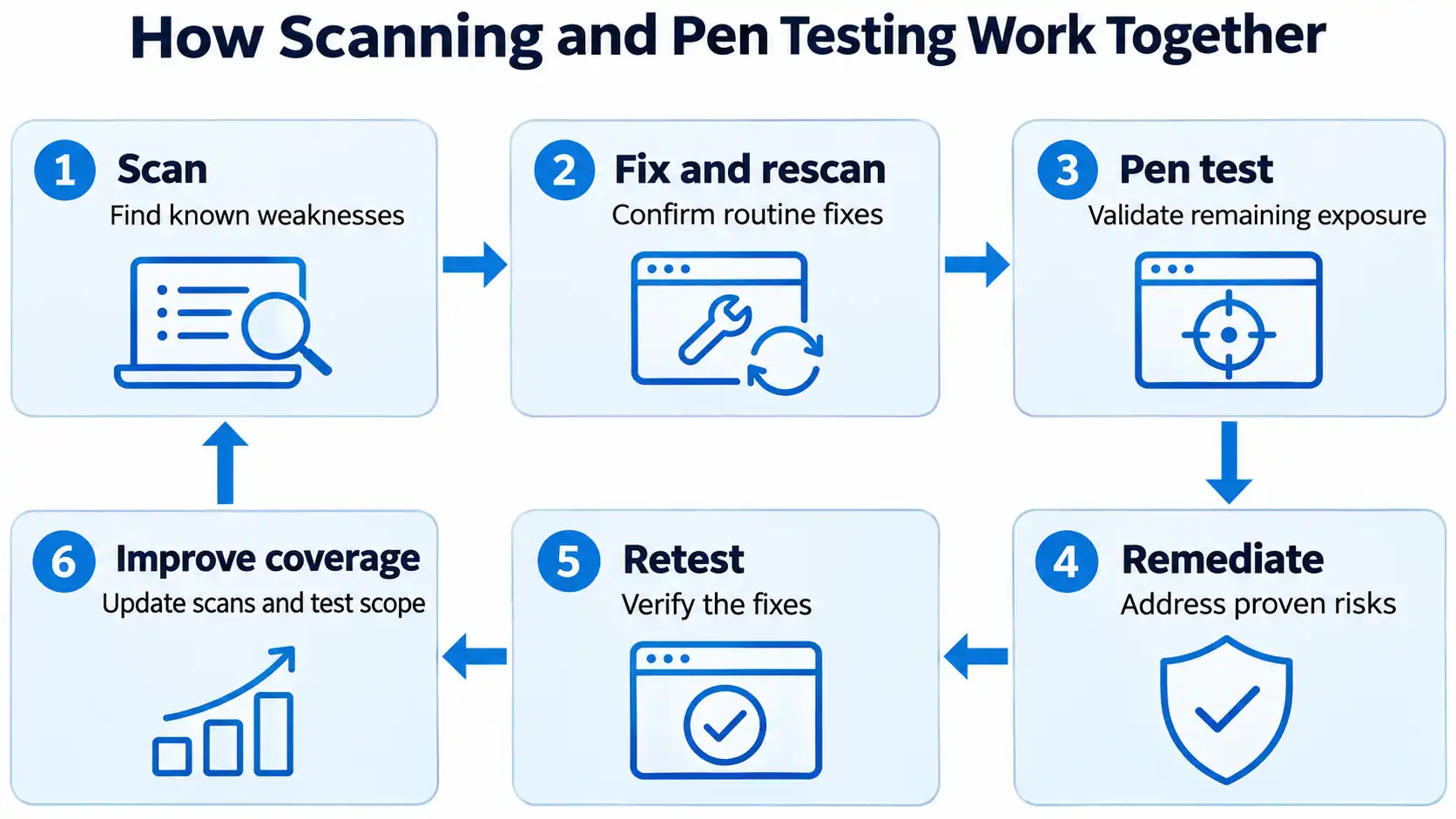
A scan and a pen test are two halves of one cycle. Run them in this order and each makes the other cheaper:
- Scan to find known flaws across everything.
- Fix and rescan before the pen test. Don’t pay a tester to report missing patches.
- Pen test to prove what’s left and find what scanners can’t see.
- Fix by severity, critical and high first.
- Retest to confirm the fixes held.
- Feed findings back into your scan settings and next year’s test scope.
Use CVSS and Known Exploited Vulnerabilities to Prioritize
A CVSS score measures how bad a flaw could be. It doesn’t tell you whether attackers are using it. CISA’s Known Exploited Vulnerabilities catalog does. Fix anything on that list first, even when its score is lower than other items on your report. Then work down by CVSS score and by how important the affected system is to your business.
A few questions come up in almost every conversation about this.
Vulnerability Scan vs Penetration Test FAQ
What is the difference between a penetration test and a vulnerability assessment?
A vulnerability assessment finds and ranks known weaknesses across your systems using automated scans and human review. A penetration test goes further. A skilled tester tries to exploit those weaknesses to prove what an attacker could reach. The assessment shows coverage and priority. The pen test shows proof and real impact.
Is a vulnerability scan the same as a penetration test?
No. A vulnerability scan is automated software that flags possible weaknesses without trying to exploit them. A penetration test is a manual attack by a person who uses those weaknesses to break in. Most pen tests include a scan as an early step, but a scan alone never counts as a pen test.
Can a vulnerability scan replace a penetration test?
No. A scan can’t chain findings together, test weak passwords at scale, judge cloud settings, or test your staff. It also can’t show whether your security tools catch an attack. Rules like PCI DSS and the FTC Safeguards Rule ask for both, because each finds problems the other misses.
Are DAST and pen testing the same?
No. Dynamic application security testing (DAST) is an automated scan of a running web app from the outside. It finds common flaws such as injection and misconfigured headers. A web app pen test uses DAST tools as one step, then adds manual work on logins, user roles, and business logic that no scanner can judge.
What is CVE vs CVSS?
A CVE is the public ID number for a known security flaw, such as CVE-2024-3400. CVSS is the 0 to 10 score that rates how severe that flaw is. The current version is CVSS 4.0. Scanners report both. A high CVSS score does not prove a flaw can be exploited in your setup.
Do vulnerability scans cause downtime?
Rarely. Most scans run quietly in the background. Older printers, legacy devices, and some factory equipment can freeze when scanned, so those get excluded or scanned gently. Scheduling scans after business hours avoids most problems. Keep workstations on and connected, or use agent-based scanning, so laptops aren’t missed.
Does a high CVSS score mean a vulnerability is exploitable?
Not always. CVSS rates how severe a flaw could be in general. Your firewall rules, settings, and other controls may block it in practice. A penetration test confirms whether it can actually be used. CISA’s Known Exploited Vulnerabilities catalog shows which flaws attackers are using right now.
How long does a vulnerability scan or penetration test take?
A network vulnerability scan takes minutes to a few hours, depending on how many devices are in scope. A web app scan can take several hours. Most small business penetration tests need one to two weeks of active testing, plus time for scoping before and a written report after.
The vulnerability scan vs penetration test choice gets easier once you stop treating them as rivals. Scan all year. Test once a year and after big changes. Fix what each one finds. This week, pull up the exact wording of the request in front of you, then check the date of your last scan and your last test. If you want help scoping a test, our penetration testing services team can walk through your setup with you.