

Ready to transform your IT experience? Reach out to our experts to discuss how our tailored solutions can meet your business needs and keep your technology running smoothly.
Outsourcing IT Services for Small Business: What It Covers, What It Costs, and When to Make the Move

Updated: Jun 05, 2025
Most small businesses don’t need a full IT department. They need their systems to work reliably, their data protected, and someone responsible for both before problems become crises. Outsourcing IT services is how most businesses in the 10-to-150 person range get all three without the cost and complexity of hiring an internal IT team.
This guide covers what IT outsourcing actually includes, what it typically costs for a business your size, how to choose between fully managed and co-managed models, and the specific signals that tell you it’s time to make the move. The goal is a working reference, not a general introduction to the concept.
AllSafe IT has managed IT for businesses across Los Angeles, Orange County, and Pasadena, earning three consecutive placements on the CRN MSP 500 Pioneer 250 list. SOC2 Type II compliant and operating under the NIST Cybersecurity Framework, the perspective throughout reflects what those client engagements show about what works, and what doesn’t, for businesses in the SMB range.

What IT Outsourcing Actually Means
Calling someone when something breaks is not IT outsourcing. That model, called break-fix, bills by the hour and responds only when problems are reported. It keeps technology barely functional but does nothing to prevent the failures that cause downtime in the first place.
IT outsourcing means contracting a managed service provider (MSP) to manage some or all of your technology on an ongoing basis. The MSP monitors your systems continuously, addresses issues before they cause downtime, applies patches on schedule, and is accountable to a written service-level agreement. You pay a predictable monthly fee rather than unpredictable hourly bills after something fails.
The structural difference matters more than it might seem. A break-fix company profits when things break. A managed services model works the opposite way: the provider profits from keeping things running, because reactive incidents generate cost on their side of the contract. That alignment changes how providers behave.
What changes when you outsource IT isn’t just who answers the support line. It’s the underlying approach to how your technology gets managed, day in and day out.
Fully Managed IT, Co-Managed IT, and Break-Fix: Which Model Fits
Most small businesses assume outsourcing IT means replacing their current setup entirely. It doesn’t have to.
Fully Managed IT
The MSP becomes your entire IT function. No internal IT staff required, and none expected. The provider handles everything from a password reset to a strategic technology recommendation, covering every device, vendor relationship, and security incident under one monthly fee.
Fully managed IT fits businesses with 10 to 80 employees that don’t have a dedicated IT person, or where the person handling IT is doing it alongside another primary role: the operations manager who “does IT on the side,” or the office administrator managing software licenses along with everything else. Those arrangements work until they don’t, and they typically stop working right when the business needs IT to be reliable.
The main advantage isn’t just coverage depth. It’s having a team of specialists who collectively understand your environment, rather than one generalist doing their best with limited time and bandwidth.
Co-Managed IT
You don’t have to eliminate your internal IT staff to benefit from outsourcing. Co-managed IT is the arrangement where an MSP works alongside your existing IT person or small team. Internal staff handles what they’re good at and have time for. The MSP fills the gaps: 24/7 monitoring, specialized cybersecurity expertise, cloud architecture, compliance documentation, and coverage when the internal person is unavailable.
This model fits organizations with one to three IT staff members who are stretched. A single IT person cannot be on call around the clock, cannot specialize simultaneously in network architecture and Microsoft 365 administration and endpoint security, and cannot provide coverage during vacation or illness. Co-managed IT solves each of those gaps without eliminating the institutional knowledge that person carries.
The provider and internal team share a ticketing system, system documentation, and a defined scope of responsibility. Overlap is agreed on before engagement starts so nobody is duplicating or stepping on the other’s work.
Break-Fix
Short-term. Low-commitment. Billed by the incident. Those are the reasons small businesses use break-fix, and also the reasons it becomes the most expensive option as a business grows.
An hourly rate looks inexpensive until you add up what you actually spend in a year: the incidents themselves, the productivity employees lose waiting for resolution, and the problems that weren’t caught before they escalated into something worse. Break-fix has no financial incentive to prevent problems because problems are the revenue source.
It’s appropriate for very small businesses with minimal technology complexity and low sensitivity to downtime. For any business that handles customer data, relies on its systems to operate, or has compliance obligations, the reactive model creates more risk than the low hourly rate justifies.
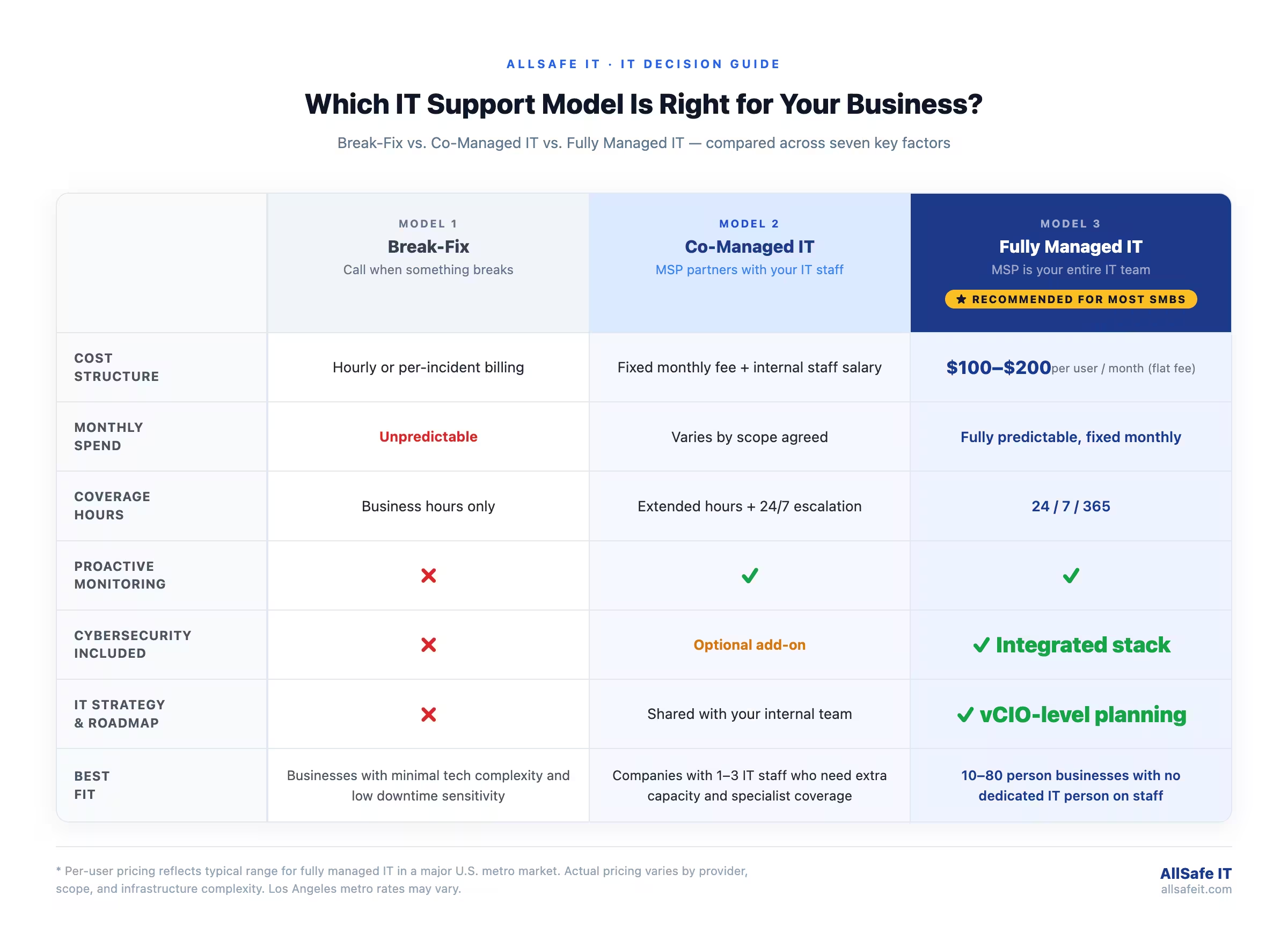
The model determines what you pay and what you get. What that payment actually covers is defined by the contract.
What Services Are Included in an Outsourced IT Engagement
A fully managed IT engagement typically covers seven standard areas. Help desk and end-user support with response times defined by severity level. Remote monitoring and management across all devices, including laptops, desktops, and servers. Patch management for operating systems and business applications on a defined schedule. Endpoint protection, the behavioral EDR layer that replaces traditional signature-based antivirus. Data backup and recovery with documented restoration procedures and tested recovery times. Vendor management, coordinating with your ISP, software vendors, and hardware suppliers on your behalf. And Microsoft 365 or Google Workspace administration, covering user provisioning, license management, and configuration.
Advanced coverage depends on the provider and your industry requirements. Managed cybersecurity adds the firewall management, email security filtering, security awareness training, and penetration testing that standard IT management doesn’t include. Cloud infrastructure management covers cloud migrations and ongoing server environment management. vCIO services bring technology roadmap development and budget planning to the engagement. IT audit and compliance documentation covers HIPAA, CCPA, GLBA, and cyber insurance requirements that most businesses can’t produce from a reactive IT setup.
Three areas most flat-fee MSP contracts exclude from standard scope: custom software development, major infrastructure projects such as full office network buildouts, and hardware procurement. These are typically quoted separately or offered through a hardware-as-a-service arrangement. Knowing what’s excluded before signing matters as much as knowing what’s included.
The scope tells you what gets managed. The cost section tells you what that management costs relative to the alternative.
How Much Does IT Outsourcing Cost for a Small Business
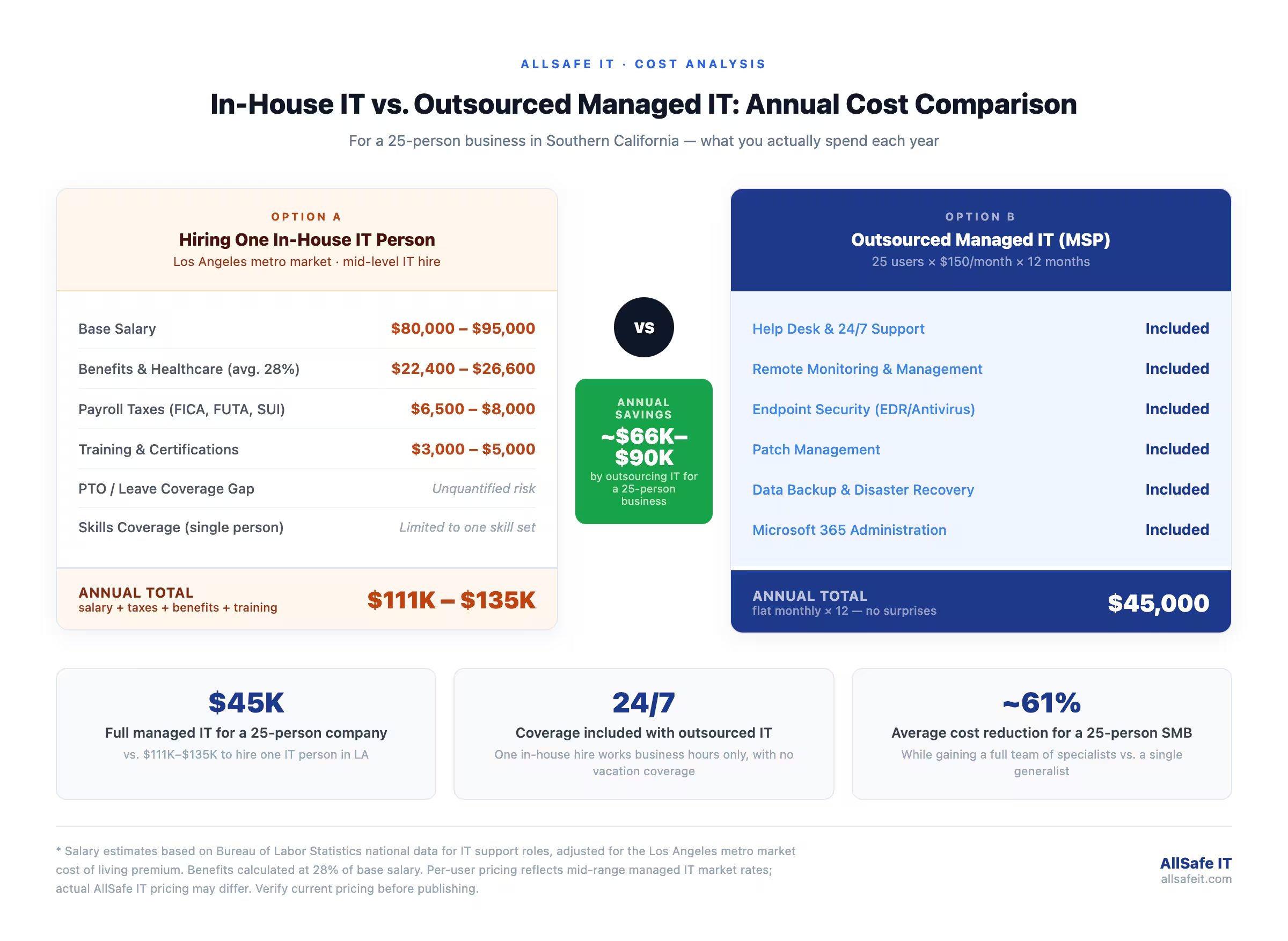
Per-user monthly pricing is the most common billing model for managed IT services. The range for a fully managed engagement in a major metro market runs from $100 to $250 per user per month, depending on service scope, infrastructure complexity, and whether cybersecurity is included or billed separately.
What drives the cost higher: regulated industry compliance such as HIPAA or CCPA documentation adds scope. Multiple office locations require more monitoring endpoints. 24/7 coverage costs more than business-hours-only coverage. Complex on-premise infrastructure costs more to manage than a straightforward cloud-based environment.
The comparison that matters for most small business owners is against the cost of hiring internally. The Bureau of Labor Statistics reports a national median annual wage of $95,360 for network and computer systems administrators. In the Los Angeles metro, mid-level IT hires run higher due to cost of living. Add benefits at roughly 28% of base salary, payroll taxes, and training costs, and the total annual employment cost for one IT person in LA runs approximately $111,000 to $135,000.
A 25-person business outsourcing at $150 per user spends $45,000 per year for a full team covering monitoring, helpdesk, security, backup, and strategic IT guidance. A 50-person business at the same rate spends $90,000 annually, still below the cost of one full-time hire, for coverage across every IT discipline around the clock. The break-even calculation shifts further in outsourcing’s favor once you account for the expertise gaps that no single employee can bridge.
Six Signals It’s Time to Outsource Your IT
Your employees call the same person every time something breaks. That person has a different job title. They manage IT on the side of their actual responsibilities, and the backlog is growing. That is the most common situation small businesses describe before deciding to outsource.
The signals vary, but they follow recognizable patterns.
Signal 1: Employees lose productive time to IT problems. Password resets, printer issues, and software installation delays that take hours are productivity losses that compound daily and are invisible on a budget spreadsheet.
Signal 2: You’ve had a security incident or data loss event, or you realize you have no documented backup and recovery plan with tested restoration procedures. The absence of a tested plan is itself a risk that break-fix IT doesn’t address.
Signal 3: Growth is outpacing your technology. New employees wait on equipment, systems don’t scale cleanly, and there’s no documented IT onboarding process. The business is outgrowing the infrastructure faster than anyone has time to address it.
Signal 4: Compliance requirements are creating documentation demands your current setup can’t produce. HIPAA audits, CCPA data subject requests, and cyber insurance renewals all require documented security posture that reactive IT management doesn’t generate.
Signal 5: One person is your single point of IT failure. Their vacation, illness, or departure would leave the business without functional IT support. That dependency creates operational risk that compounds over time.
Signal 6: Break-fix bills are climbing and unpredictable. Monthly IT spend varies based on what broke, which makes accurate technology budgeting impossible.
Three or more of these signals in the same business is a clear indicator that the current approach costs more than managed services would. Even one can justify a conversation about co-managed IT.
IT Outsourcing for Southern California Businesses: What to Factor In
Los Angeles consistently ranks as the most traffic-congested metro area in the United States, according to INRIX’s 2024 Global Traffic Scorecard. That fact shapes how businesses in the LA basin structure their operations, including IT. Employees are permanently distributed across multiple counties, co-working locations, and home offices. IT support that depends on physical presence for routine tasks doesn’t fit that operational reality. Remote monitoring and remote support resolve the majority of IT issues regardless of where an employee is working from on any given day.
California’s compliance layer adds context that national IT outsourcing guides skip entirely. CCPA and CPRA impose data handling obligations that require documented workflows, audit trails, and vendor agreements. The CPPA’s 2025 enforcement updates added mandatory cybersecurity audits for qualifying businesses. An MSP managing IT for California businesses should understand what those obligations require technically, not apply a generic compliance checklist written for a business in another state.
The region’s industry mix makes this more than theoretical. LA County’s healthcare sector is the region’s largest private employer, and HIPAA’s Security Rule requires specific technical safeguards from every organization handling patient data. Our HIPAA security services are built around those documented requirements. Financial services firms in Newport Beach and Irvine carry GLBA Safeguards Rule obligations alongside CCPA. Entertainment companies in Hollywood and Burbank handle IP that requires specific access controls even outside standard privacy frameworks. An IT audit and compliance review maps the specific obligations that apply to your industry before a provider commitment is made.
SoCal’s physical risk profile adds one more dimension no national guide addresses. SoCal Edison’s Public Safety Power Shutoff events affect specific geographic zones on a recurring basis. Seismic exposure is real and documented across the region. A managed IT provider operating in Southern California should have continuity protocols for power shutoff events and tested backup procedures with geographic redundancy outside the SoCal fault zone. That’s a different conversation than the generic “disaster recovery planning” language that appears in most national MSP marketing.
Common Mistakes When Outsourcing IT Services
The most expensive mistake isn’t choosing the wrong provider. It’s signing a contract without reading what’s excluded. “Unlimited support” appears in many MSP agreements alongside scope carve-outs that bill separately for cybersecurity incidents, major projects, and hardware issues. The base fee looks reasonable. The actual monthly spend looks different after the first significant incident.
Choosing based on price alone compounds this problem. The lowest-priced provider carries the thinnest margins, which typically means slower response times, less experienced staff, and less investment in monitoring tools and staff training. A single prolonged outage or security gap almost always costs more than the price difference between a budget provider and a mid-range one.
Outsourcing IT but keeping cybersecurity separate creates a specific accountability gap. A provider managing your systems without responsibility for securing them sees everything that happens in your environment but has no mandate to protect it. The providers that produce the best outcomes integrate IT and cybersecurity into one managed service so the team monitoring your environment is also the team responsible for defending it.
Failing to document the environment before transitioning creates the most operational disruption. Moving from break-fix to managed services, or switching from one MSP to another, without complete documentation of systems, credentials, licenses, and network architecture creates expensive recovery work and delays the start of real value delivery. A thorough asset and configuration inventory before day one of the new engagement is not optional.
Treating the MSP as a vendor rather than a partner produces the weakest outcomes. Organizations that share strategic context with their provider, include the MSP in planning conversations, and engage with technology roadmap discussions get measurably better technology decisions. The relationship functions like any other advisory engagement: the quality of the input shapes the quality of the guidance.

What to Look for in an IT Outsourcing Partner
Ask for the SLA before you ask for the price. Specifically, ask for severity-level response times in writing. An office-down situation and a single employee password reset should not be in the same response category. Providers who can’t produce a specific, written SLA for different incident types are telling you something about how they manage accountability.
Beyond response times, evaluate on these criteria:
Does the provider operate under a documented security framework, such as the NIST Cybersecurity Framework? Generic providers work reactively from ticket queues. Framework-based providers measure and report against a documented security standard that can be audited by your insurance carrier or compliance reviewer.
Is monthly pricing genuinely fixed, or does the contract contain scope exclusions that generate additional billing? Ask specifically what is not included, and ask how those items are billed when they occur. The answer reveals how the provider actually makes money.
Can they produce a technology roadmap and participate in budget planning, or do they only close tickets? A provider who can’t engage with a 12-month technology plan is not functioning as a strategic partner. They’re functioning as a helpdesk.
Do they have documented experience with your specific compliance obligations? HIPAA for a medical practice, GLBA for a financial firm, and CCPA for any California business require different technical controls and different documentation. Ask for examples of how they’ve addressed those requirements for similar clients, not assurances that they can handle it.
Are they physically local enough to provide on-site support when needed? Remote resolution handles the majority of IT issues, but some situations require physical presence: hardware failures, office network installations, security incidents that require on-site investigation. A Pasadena or LA-based team responds to those situations differently than a national provider dispatching a third-party contractor.
What does monthly reporting include? Security posture, tickets closed, compliance status, and proactive recommendations should be part of a standard monthly deliverable. You should understand your security and IT posture at any point in time, not assume it.
AllSafe IT operates under the NIST Cybersecurity Framework, holds SOC2 Type II compliance, and delivers monthly security and IT posture reports to every client as part of the standard engagement. Three consecutive years on the CRN MSP 500 Pioneer 250 list reflects sustained delivery of that standard across a client base in Los Angeles, Orange County, and Pasadena.
Making the Right IT Decision for Your Business
Outsourcing IT services isn’t an all-or-nothing commitment. Most businesses start with a specific gap: no after-hours coverage, a compliance requirement they can’t document internally, or a security incident that made the risk concrete. The right provider starts where you are and builds toward where your business needs to go.
AllSafe IT works with businesses across Los Angeles, Orange County, and Pasadena on IT outsourcing engagements built around fixed pricing, a documented framework, and monthly reporting you can read without a technical background. If you want to understand where your current IT setup stands and what closing its gaps would cost, contact our team to schedule an assessment.
Frequently Asked Questions
What does an outsourced IT service actually include for a small business?
A standard fully managed IT engagement covers help desk support, remote monitoring and management across all devices, patch management, endpoint protection, data backup with tested restoration procedures, vendor management, and Microsoft 365 or Google Workspace administration. Advanced coverage, including managed cybersecurity, cloud infrastructure, vCIO strategy services, and compliance documentation, varies by provider and is often tiered separately. The most important thing to confirm before signing is what’s explicitly excluded and how those items are billed.
How much does it cost to outsource IT for a 25-person company?
Per-user monthly pricing is the most common model. For a 25-person business in the Los Angeles metro market, a fully managed IT engagement with standard scope typically runs in the range of $100 to $250 per user per month, putting the annual spend at approximately $30,000 to $75,000 depending on scope and provider. That compares against an annual total employment cost of $111,000 to $135,000 for a single mid-level IT hire in LA, before accounting for the coverage gaps that one person creates.
What is the difference between fully managed IT and co-managed IT?
Fully managed IT means the MSP is your entire IT function with no internal IT staff involved. Co-managed IT means the MSP works alongside your existing IT person or small team, filling specific gaps in coverage, specialization, or hours rather than replacing internal staff entirely. Co-managed is the right model when you have a capable internal IT person who is stretched thin, lacks specific expertise (cybersecurity, cloud architecture), or cannot provide 24/7 coverage alone. Fully managed is the right model when you have no internal IT staff and need complete coverage.
Should I outsource IT if I already have an in-house IT person?
Having an internal IT person doesn’t eliminate the case for outsourcing. One person cannot cover every discipline, provide 24/7 availability, or prevent the operational risk that comes from being a single point of failure. Co-managed IT is designed specifically for this situation: the MSP fills the gaps in specialization, after-hours coverage, and strategic guidance while the internal person retains day-to-day control and institutional knowledge. Most businesses with one IT person find that co-managed IT makes that person more effective rather than redundant.
What are the biggest risks of outsourcing IT services?
The most common risks are scope-related rather than capability-related. Hidden scope exclusions in contracts lead to surprise billing. Separate IT and cybersecurity contracts create accountability gaps. Inadequate SLA definitions allow slow response times to be technically compliant. The best mitigation is a thorough contract review before signing, with specific written SLA commitments by incident severity, clear definitions of what is and isn’t included, and confirmation that cybersecurity is integrated into the IT management engagement rather than purchased separately.
How long does it take to switch from in-house IT to a managed service provider?
A structured MSP onboarding typically takes four to eight weeks from contract signing to full management transition. The first phase involves a complete documentation and asset inventory of all systems, credentials, software licenses, network configurations, and vendor relationships. The second phase covers tool deployment: the provider installs monitoring agents, backup software, and endpoint protection across all devices. The third phase is a parallel run period where the MSP monitors and responds while the previous setup is still active. Businesses that enter the transition with good documentation move through it faster. Those without documentation spend more time in the first phase.